Table of Contents
Open Table of Contents
Résumé pour la direction
Scenario
Dans le cadre de la migration en cours, l’équipe Nautilus DevOps devait rétablir rapidement l’accès à des données d’état persistantes déjà stockées sur un disque managé Azure existant. Le besoin portait sur le rattachement de ce disque de données à une machine virtuelle en production, devops-vm, dans la région East US.
Cette opération était nécessaire pour garantir la continuité d’accès aux données applicatives sans recréation de stockage ni copie supplémentaire. L’exigence principale consistait à associer explicitement le disque en Data Disk avec le LUN 0, afin d’assurer un mapping stable et prévisible au niveau du système d’exploitation, notamment après redémarrage.
L’affectation explicite d’un LUN réduit les risques liés aux changements de nommage dynamique des périphériques blocs côté OS.
Resolution
Le disque managé existant devops-disk a été rattaché avec succès à la machine virtuelle devops-vm via le portail Azure. L’affectation du LUN 0 a permis de conserver une correspondance cohérente entre la configuration Azure et la présentation du disque au système invité.
Le résultat répond au besoin de migration en restaurant l’accès aux données persistantes, tout en améliorant la prévisibilité opérationnelle et en limitant les risques d’erreur lors des redémarrages ou des opérations de maintenance.
Le rattachement a été validé avec succès et la machine virtuelle peut de nouveau consommer le volume de données attendu.
Technical Implementation
Topology
The target environment is hosted in East US and centers on an operational Azure virtual machine named devops-vm. The task required attaching an already provisioned managed disk named devops-disk as a data disk, with an explicit LUN value of 0.
This is a straightforward compute-to-storage attachment scenario:
- Region: East US
- Virtual Machine:
devops-vm - Managed Disk:
devops-disk - Disk Type Role: Data Disk
- LUN:
0
Although the operation was completed through the Azure Portal, the same task is well-suited for repeatable headless execution using Azure CLI or Azure PowerShell, especially in migration, recovery, or IaC-aligned operational workflows.
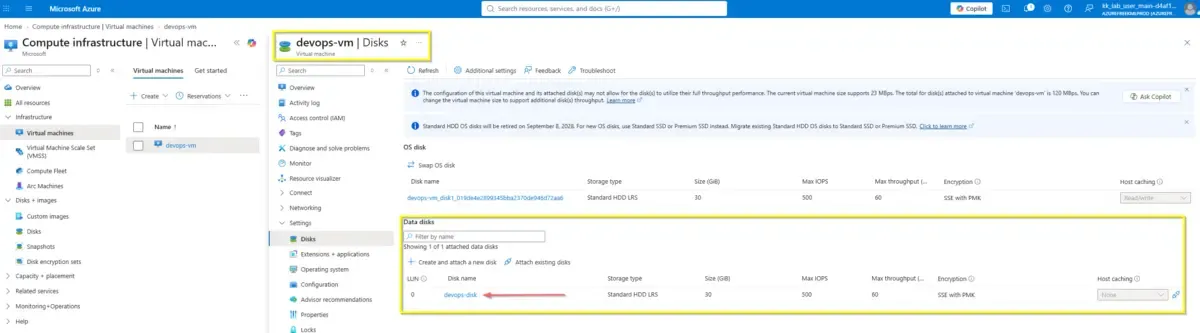
Explicit LUN assignment is recommended when operating systems, automation, or application mounts depend on deterministic disk ordering.
Action
The disk attachment was executed from the Azure Portal by selecting the target VM, opening the Disks configuration, and attaching the existing managed disk devops-disk as a data disk. The LUN was manually set to 0 before saving the configuration.
From an engineering perspective, this manual action maps cleanly to scriptable operations and should be translated into command-line automation for consistency across environments. For production-grade cloud operations, this reduces dependency on GUI workflows and supports auditable, repeatable execution.
Before attaching an existing managed disk, verify that it is not already attached to another VM unless the disk type and workload explicitly support that access pattern.
Below are the exact scripts to perform the same operation using Azure CLI and Azure PowerShell with the specified parameters.
#!/usr/bin/env bash

RESOURCE_GROUP="<your-resource-group>"
VM_NAME="devops-vm"
DISK_NAME="devops-disk"
LUN="0"

az vm disk attach \
  --resource-group "$RESOURCE_GROUP" \
  --vm-name "$VM_NAME" \
  --name "$DISK_NAME" \
  --lun "$LUN"attach-existing-managed-disk.sh
$ResourceGroup = "<your-resource-group>"
$VmName = "devops-vm"
$DiskName = "devops-disk"
$Lun = 0
$vm = Get-AzVM -ResourceGroupName $ResourceGroup -Name $VmName
$disk = Get-AzDisk -ResourceGroupName $ResourceGroup -DiskName $DiskName
$vm = Add-AzVMDataDisk `
-VM $vm `
-Name $Disk.Name `
-ManagedDiskId $disk.Id `
-Lun $Lun `
-CreateOption Attach
Update-AzVM `
-ResourceGroupName $ResourceGroup `
-VM $vmAttach-ExistingManagedDisk.ps1OS-Level Configuration (Linux)
Attaching the disk at the infrastructure layer is only the first phase. To make the storage usable and ensure data persists reliably across VM reboots, the disk must be initialized and mounted at the operating system level.
Below is the standard Linux administration workflow executed via SSH to bring the attached LUN 0 online:
# 1. Identify the newly attached block device (LUN 0 is typically mapped to /dev/sdc)
lsblk -o NAME,HCTL,SIZE,MOUNTPOINT

# 2. Format the disk (Assuming a raw, unformatted disk for a new migration)
sudo mkfs.ext4 /dev/sdc

# 3. Create a dedicated mount point
sudo mkdir -p /mnt/datadisk

# 4. Retrieve the absolute disk UUID for deterministic mounting
sudo blkid /dev/sdc

# 5. Append the UUID to /etc/fstab to guarantee persistence across reboots
# (Replace UUID_VALUE with the actual UUID output from the previous command)
echo "UUID=UUID_VALUE /mnt/datadisk ext4 defaults,nofail 1 2" | sudo tee -a /etc/fstab

# 6. Mount the filesystem immediately without rebooting
sudo mount -amount-datadisk.shUsing the universally unique identifier (UUID) instead of the block device name (like /dev/sdc) is a mandatory industry standard. Azure does not guarantee that block device paths will remain consistent after a VM restart.
Additionally, adding the nofail parameter ensures that the VM boot process will not halt if the data disk is temporarily detached or unavailable.