Table of Contents
Open Table of Contents
Résumé pour la direction
Scenario
L’équipe Nautilus DevOps devait rattacher une interface réseau déjà provisionnée, nautilus-nic, à la machine virtuelle existante nautilus-vm dans la région East US. L’objectif était de modifier le routage réseau et d’améliorer l’isolation des flux applicatifs sans recréer la machine virtuelle.
Cette opération est nécessaire dans les environnements cloud où l’évolution des besoins réseau impose une reconfiguration contrôlée des ressources existantes. Dans Azure, l’attachement d’une carte réseau supplémentaire ou alternative à une VM existante est soumis à une contrainte d’architecture importante : cette modification ne peut pas être réalisée à chaud sur une machine virtuelle en cours d’exécution.
Azure ne permet pas d’attacher une interface réseau à une machine virtuelle active. La VM doit être arrêtée puis désallouée avant toute modification de ce type.
Resolution
Après une première tentative bloquée par la restriction Azure indiquant que l’opération ne peut pas être effectuée sur une machine virtuelle en fonctionnement, la VM a été arrêtée proprement puis désallouée. Une fois cet état confirmé, l’interface réseau existante nautilus-nic a été attachée avec succès à nautilus-vm via le portail Azure.
Le résultat final a permis de reconfigurer la connectivité de la VM sans redéploiement, tout en respectant les contraintes natives de la plateforme. Cette intervention apporte une meilleure maîtrise du réseau, réduit le risque opérationnel et valide la procédure standard à suivre pour ce type de changement en production ou en préproduction.
Technical Implementation
Topology
The task targeted an existing Azure virtual machine and an already provisioned network interface in the same region.
Resources involved:
- Region: East US
- Virtual Machine:
nautilus-vm - Network Interface:
nautilus-nic
From an Azure architecture perspective, NIC attachment to an existing VM is not a hot-plug operation. The VM must first be transitioned to a deallocated state before Azure allows the compute model to be updated.
This was primarily a portal-based operation, but the same workflow maps cleanly to headless execution through Azure CLI or Azure PowerShell.

A VM can only use compatible NIC configurations. Ensure the NIC exists in the same region and can be associated with the target VM before starting the change.
Action
The implementation followed a controlled two-step sequence:
- Attempt to attach the existing NIC to
nautilus-vm. - Receive the Azure platform restriction indicating the operation cannot be performed while the VM is running.
- Perform a graceful stop and deallocate the VM.
- Retry the NIC attachment from the Azure Portal.
- Confirm that
nautilus-nicis now associated withnautilus-vm.
This is a good example of a common transition from GUI-based administration to repeatable Infrastructure as Code or scripted operations. While the portal is useful for one-off validation, production-grade changes should be reproducible through automation.
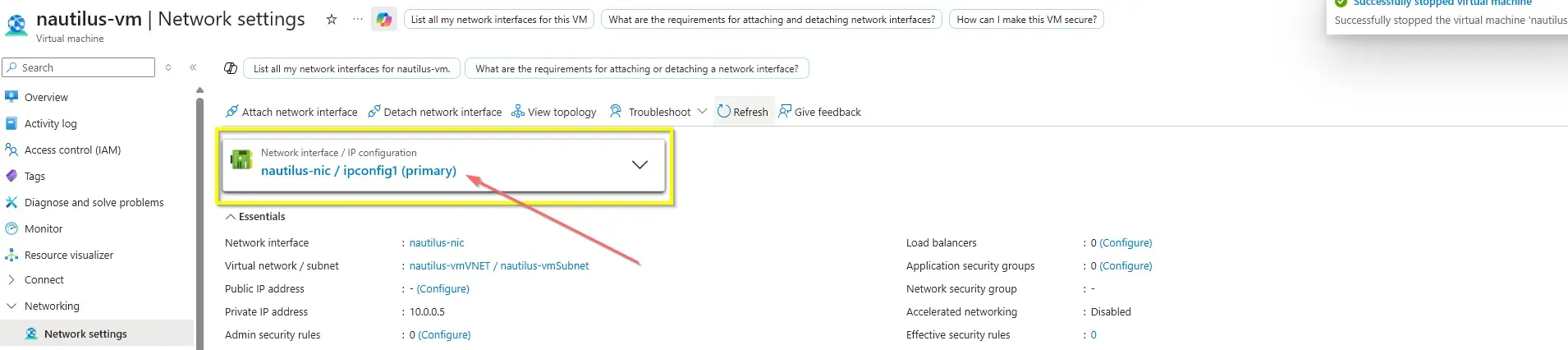
The NIC attachment completed successfully after the VM was deallocated, validating the expected Azure operational constraint and resolution path.
If the VM has only one NIC and you are changing primary connectivity, validate IP configuration, NSG associations, and effective routes after the update.
Attaching a secondary NIC to an existing VM introduces complexities at the OS layer.
- Primary Designation: Azure requires exactly one NIC to be designated as the Primary interface. This primary NIC dictates the default gateway for the VM.
- Asymmetric Routing: In Linux/Windows, if traffic enters the secondary NIC, the OS might attempt to reply via the primary NIC’s default gateway, causing the traffic to be dropped. When implementing multi-NIC VMs in production, ensure that OS-level static routing (e.g.,
iproute2in Linux) is configured correctly to handle ingress and egress traffic on the correct interfaces.
Azure CLI
#!/usr/bin/env bash

set -euo pipefail

RESOURCE_GROUP="<resource-group>"
VM_NAME="nautilus-vm"
NIC_NAME="nautilus-nic"

az vm deallocate \
  --resource-group "$RESOURCE_GROUP" \
  --name "$VM_NAME"

az vm nic add \
  --resource-group "$RESOURCE_GROUP" \
  --vm-name "$VM_NAME" \
  --nics "$NIC_NAME"

az vm start \
  --resource-group "$RESOURCE_GROUP" \
  --name "$VM_NAME"attach-nic-to-vm.sh
Azure PowerShell
$ResourceGroup = "<resource-group>"
$VmName = "nautilus-vm"
$NicName = "nautilus-nic"

Stop-AzVM -ResourceGroupName $ResourceGroup -Name$VmName -Force

$vm = Get-AzVM -ResourceGroupName$ResourceGroup -Name $VmName$nic = Get-AzNetworkInterface -ResourceGroupName $ResourceGroup -Name$NicName

Add-AzVMNetworkInterface -VM $vm -Id$nic.Id
Update-AzVM -ResourceGroupName $ResourceGroup -VM$vm

Start-AzVM -ResourceGroupName $ResourceGroup -Name$VmNameAttach-NicToVm.ps1