Table of Contents
Open Table of Contents
Résumé pour la direction
Scenario
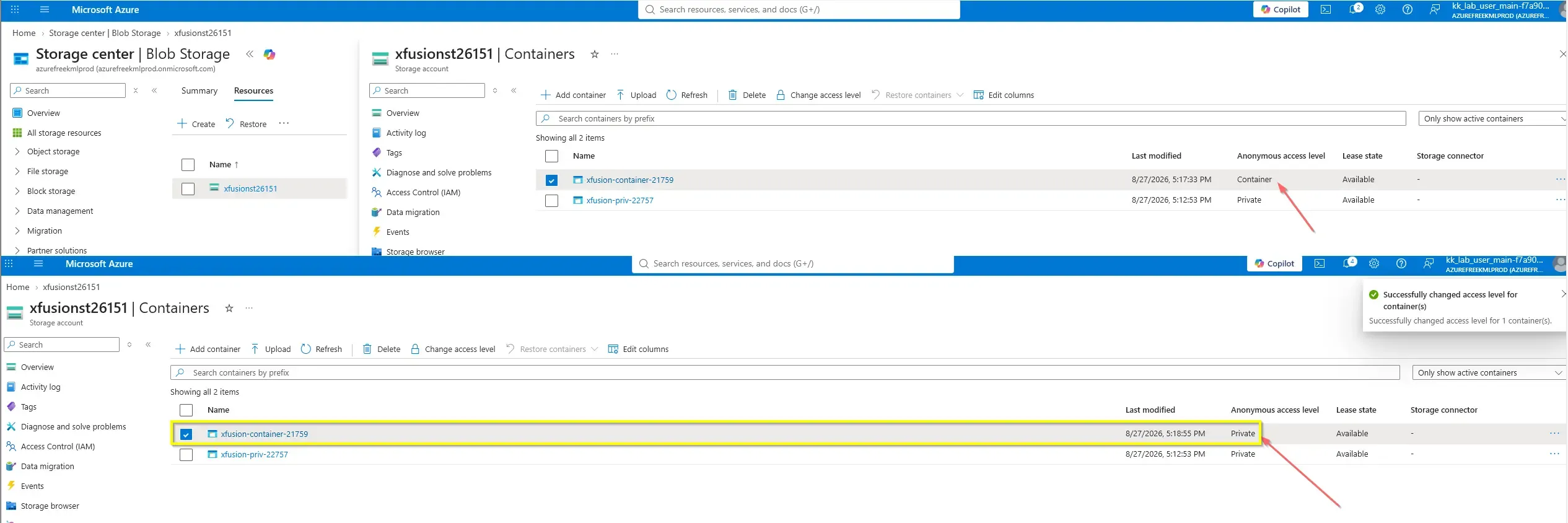
Dans le cadre d’un contrôle de sécurité, un conteneur Blob Azure mal configuré a été identifié avec un niveau d’accès public actif, exposant potentiellement des données liées à une migration au réseau public. Le conteneur concerné, xfusion-container-21759, hébergé dans le compte de stockage xfusionst26151 en région South Central US, devait être corrigé immédiatement afin de limiter l’accès aux seuls usages internes autorisés.
L’exigence métier était claire : supprimer l’exposition anonyme sur ce conteneur précis sans impacter les autres conteneurs déjà conformes, notamment xfusion-priv-22757, qui devait rester inchangé avec un accès privé. Cette approche ciblée permet de réduire le risque de fuite d’information tout en évitant toute perturbation des opérations en cours.
Resolution
La remédiation a été effectuée avec succès en révoquant l’accès public anonyme au niveau du conteneur xfusion-container-21759, qui est ainsi passé d’un état Public à Private. Le conteneur xfusion-priv-22757 est resté intact, conformément au périmètre d’intervention.
Cette correction apporte une valeur immédiate sur le plan de la sécurité en supprimant une vulnérabilité exposée à Internet, tout en respectant le principe de moindre privilège. La validation finale confirme que seul le conteneur ciblé a été modifié, sans effet de bord sur les autres ressources du compte de stockage.
Technical Implementation
Topology
The remediation was performed at the container level inside an existing Azure Storage Account, without changing account-wide storage configuration or impacting compliant containers.
Scope of change
- Storage Account:
xfusionst26151 - Region:
South Central US - Target Container:
xfusion-container-21759 - Required Change:
Public→Private - Unchanged Container:
xfusion-priv-22757remainsPrivate
This was a focused headless / CLI-friendly security operation designed for repeatability and automation. The objective was to remove anonymous public read access only from the affected blob container.
Architectural Insight — Tactical vs. Strategic Remediation: Fixing access at the individual container level successfully addresses the immediate vulnerability (Tactical Remediation). However, it leaves the door open for human error on future containers. The absolute enterprise best practice (Strategic Governance) is to explicitly disable ‘Blob anonymous access’ at the entire Storage Account level, or proactively enforce it using Azure Policy (e.g., “Storage account public access should be disallowed”). This establishes a hard security boundary and prevents future configuration drift.
Action
The remediation updated the container access level to off, which disables anonymous public access for that specific container.
Azure CLI remediation
The following Azure CLI script performs the exact container-level access remediation:
#!/usr/bin/env bash
set -euo pipefail

RESOURCE_GROUP="${RESOURCE_GROUP:-<resource-group-name>}"
STORAGE_ACCOUNT="xfusionst26151"
CONTAINER_NAME="xfusion-container-21759"

az storage container set-permission \
  --account-name "$STORAGE_ACCOUNT" \
  --name "$CONTAINER_NAME" \
  --public-access off \
  --auth-mode loginremediate-blob-container-access.sh
Azure CLI validation
Use this command to confirm the container is no longer publicly accessible:
#!/usr/bin/env bash
set -euo pipefail

STORAGE_ACCOUNT="xfusionst26151"
CONTAINER_NAME="xfusion-container-21759"

az storage container show \
  --account-name "$STORAGE_ACCOUNT" \
  --name "$CONTAINER_NAME" \
  --auth-mode login \
  --query "properties.publicAccess" \
  --output tsvvalidate-blob-container-access.sh
Expected result:
- Empty / null public access value, indicating private access only
This approach remediates only the affected container and avoids changing compliant containers such as xfusion-priv-22757.
PowerShell remediation
The following PowerShell script automates the same security fix:
param(
    [Parameter(Mandatory = $false)]
    [string]$StorageAccountName = "xfusionst26151",

    [Parameter(Mandatory = $false)]
    [string]$ContainerName = "xfusion-container-21759"
)

$ctx = New-AzStorageContext -StorageAccountName $StorageAccountName -UseConnectedAccount
Set-AzStorageContainerAcl -Name $ContainerName -Context $ctx -Permission OffRemediate-BlobContainerAccess.ps1
PowerShell validation
param(
    [Parameter(Mandatory = $false)]
    [string]$StorageAccountName = "xfusionst26151",

    [Parameter(Mandatory = $false)]
    [string]$ContainerName = "xfusion-container-21759"
)

$ctx = New-AzStorageContext -StorageAccountName $StorageAccountName -UseConnectedAccount
(Get-AzStorageContainer -Name $ContainerName -Context $ctx).PublicAccessValidate-BlobContainerAccess.ps1
Expected result:
- No public access value returned for the target container
Ensure the executing identity has sufficient permissions on the storage account, such as a role allowing blob container management.
Operational notes
This task was executed as a targeted security remediation, not as a full infrastructure redeployment. Since the issue was isolated to one existing blob container, the most efficient and least disruptive method was to update the container ACL directly rather than introduce unnecessary template complexity.
From an Infrastructure as Code perspective, this pattern is easy to integrate into:
- Azure DevOps pipelines
- GitHub Actions workflows
- Scheduled compliance remediation jobs
- Policy-driven operational runbooks
For long-term hardening, consider combining this tactical fix with Azure Policy controls that deny or audit public blob container exposure across all storage accounts.