Table of Contents
Open Table of Contents
Résumé pour la direction
Scenario
Dans le cadre d’un déploiement d’infrastructure minimaliste et sécurisé sur Microsoft Azure, l’objectif était de provisionner une machine virtuelle Ubuntu dans la région Central US avec une adresse IP publique statique et un accès administrateur exclusivement basé sur une clé SSH BYOK (Bring Your Own Key).
Ce besoin répond à plusieurs exigences courantes en environnement professionnel :
- garantir une adresse IP stable pour l’administration distante, les règles de filtrage réseau ou l’intégration future à des services externes ;
- éviter l’usage d’authentification par mot de passe afin de réduire la surface d’attaque ;
- conserver la maîtrise du cycle de vie des clés en générant la paire cryptographique localement sur le poste client, plutôt qu’en téléchargeant une clé générée côté cloud via navigateur.
Cette approche s’inscrit dans une logique de standardisation des déploiements, de durcissement de la sécurité d’accès et de préparation à une automatisation plus large via ligne de commande et Infrastructure as Code.
Resolution
Le déploiement a été réalisé avec succès en créant une VM Ubuntu Standard_B1s nommée datacenter-vm, associée à une IP publique statique nommée datacenter-pip, puis configurée pour autoriser l’accès SSH sans mot de passe à l’aide d’une clé publique locale injectée au moment de la création.
La validation fonctionnelle confirme :
- la disponibilité de la VM dans Central US ;
- l’affectation correcte d’une adresse IP publique statique ;
- la possibilité d’administrer le serveur en SSH par clé ;
- l’adoption d’une méthode plus sûre que le téléchargement d’un fichier
.pemgénéré via interface web.
La valeur métier apportée est double : une mise en service rapide d’un point d’administration cloud fiable, et une amélioration nette de la posture de sécurité grâce à la conservation locale de la clé privée.
Technical Implementation
Topology
The target design was intentionally simple and aligned with native Azure capabilities:
- Region: Central US
- Virtual Machine:
datacenter-vm - OS: Ubuntu
- Size:
Standard_B1s - Public IP Resource:
datacenter-pip - Public IP Allocation: Static
- Authentication Model: SSH public key authentication using a client-generated RSA key pair
This deployment can be executed fully in CLI/headless mode, which makes it suitable for repeatable operations, remote administration workflows, and future CI/CD integration.
Azure CLI supports efficient provisioning without over-engineering. The public IP can be created explicitly when static allocation is required, then attached during VM creation. The SSH public key is passed directly to the VM resource so that passwordless access is ready immediately after provisioning.
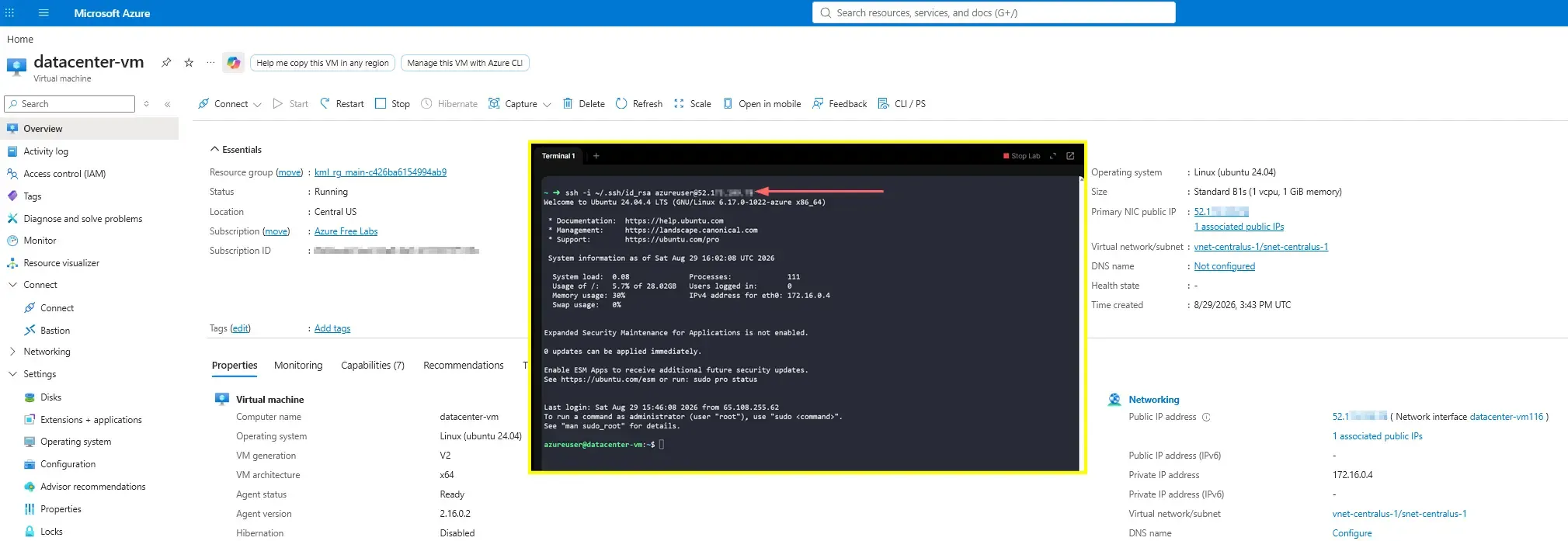
A static public IP is useful when you need consistent remote access, firewall allowlisting, or predictable DNS mapping.
Architectural Insight
Client-side BYOK SSH is more secure than downloading a cloud-generated .pem file through a browser because the private key never leaves the administrator’s trusted endpoint. This reduces exposure to:
- browser download risks;
- unmanaged local download directories;
- accidental sharing or synchronization to insecure locations;
- unclear custody of key generation and handling.
With BYOK, Azure only receives the public key, while the private key remains solely under client control. This follows a stronger security model based on key ownership, limited disclosure, and better operational accountability.
Never upload or store the private key in Azure VM metadata, cloud storage, email, or shared documentation.
Action
The implementation followed a clean CLI-driven workflow:
- Generate an RSA key pair locally with
ssh-keygen. - Create a static Azure public IP resource named
datacenter-pip. - Provision the Ubuntu VM
datacenter-vmin Central US. - Inject the local public key during VM creation.
- Associate the previously created static public IP to the VM.
- Validate remote access using SSH.
This workflow reflects a practical transition from GUI-based provisioning to a more auditable and repeatable command-line deployment model.
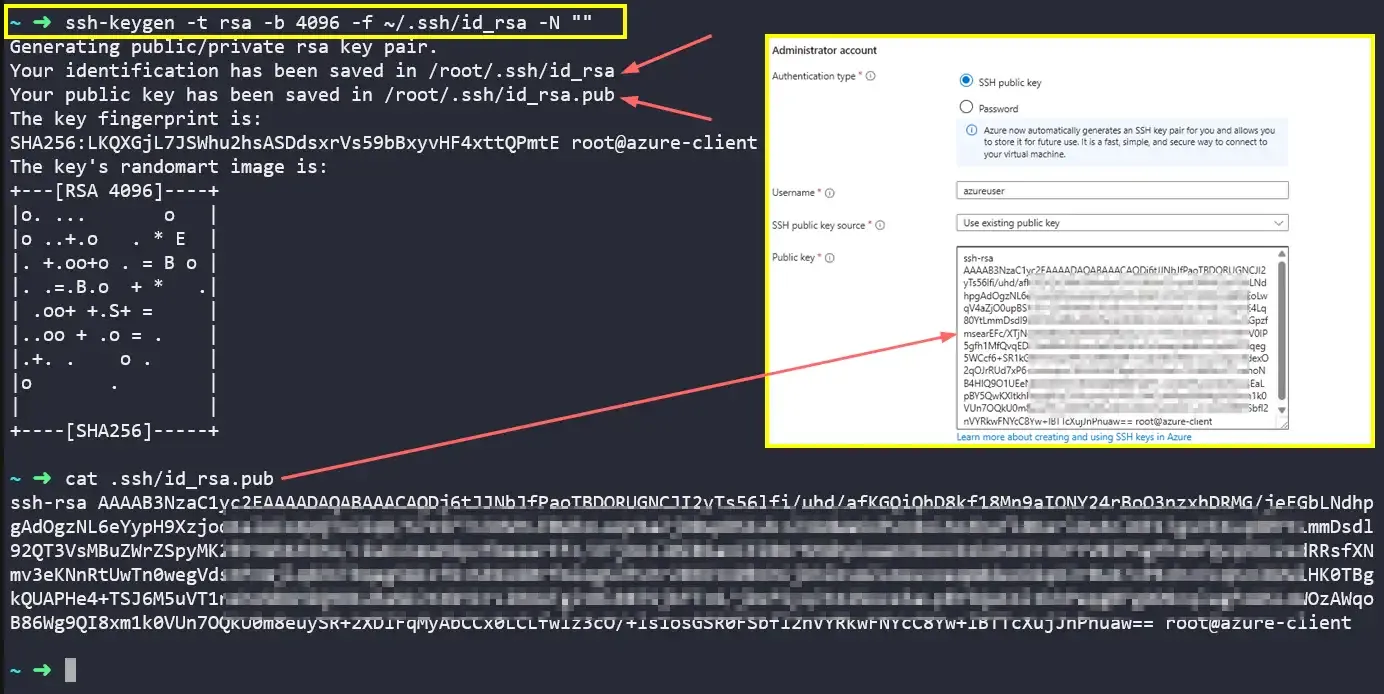
1) Generate the SSH key pair locally
ssh-keygen -t rsa -b 4096 -f ~/.ssh/id_rsa -N ""generate-ssh-key.shThis creates:
- private key:
~/.ssh/id_rsa - public key:
~/.ssh/id_rsa.pub
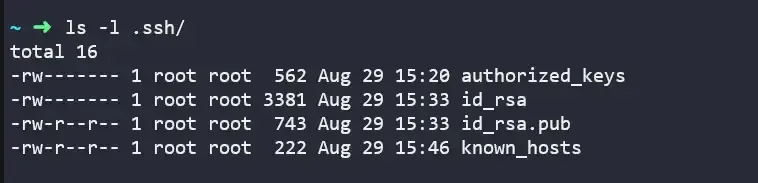 As shown below, the ssh-keygen utility automatically applies the strict security permissions required for SSH keys (600 for the private key, 644 for the public key), eliminating the need for manual chmod adjustments.
Generating keys locally ensures the private key remains under operator control from creation to usage, with strict file-level access controls enforced by the OS.
2) Create the static public IP
az network public-ip create \
  --resource-group myResourceGroup \
  --name datacenter-pip \
  --location centralus \
  --sku Standard \
  --allocation-method Staticcreate-public-ip.sh
This explicitly provisions a reusable static public IP resource before the VM is created.
3) Create the VM and inject the local public key
Use this command to list an existing resource group, in case need to create a resource inside an existing group.
az group list --query '[].name' --output tsvlist-RG.shaz vm create \
--resource-group myResourceGroup \
--name datacenter-vm \
--location centralus \
--image Ubuntu2204 \
--size Standard_B1s \
--admin-username azureuser \
--public-ip-address datacenter-pip \
--authentication-type ssh \
--ssh-key-values ~/.ssh/id_rsa.pubcreate-vm.shThis command provisions the VM and attaches:
- the existing static public IP
datacenter-pip; - the client-generated SSH public key for passwordless login.
Azure CLI can implicitly create dependent resources such as NIC, VNet, subnet, and NSG when not explicitly defined, keeping the deployment concise and idiomatic.
This is a good example of using Azure CLI native defaults efficiently instead of manually creating every dependent resource without a business need.
4) Connect to the VM
After deployment, retrieve the public IP if needed:
az vm show \
  --resource-group myResourceGroup \
  --name datacenter-vm \
  -d \
  --query publicIps \
  --output tsvget-public-ip.sh
Then connect using the private key:
ssh -i ~/.ssh/id_rsa azureuser@<PUBLIC_IP>connect-vm.sh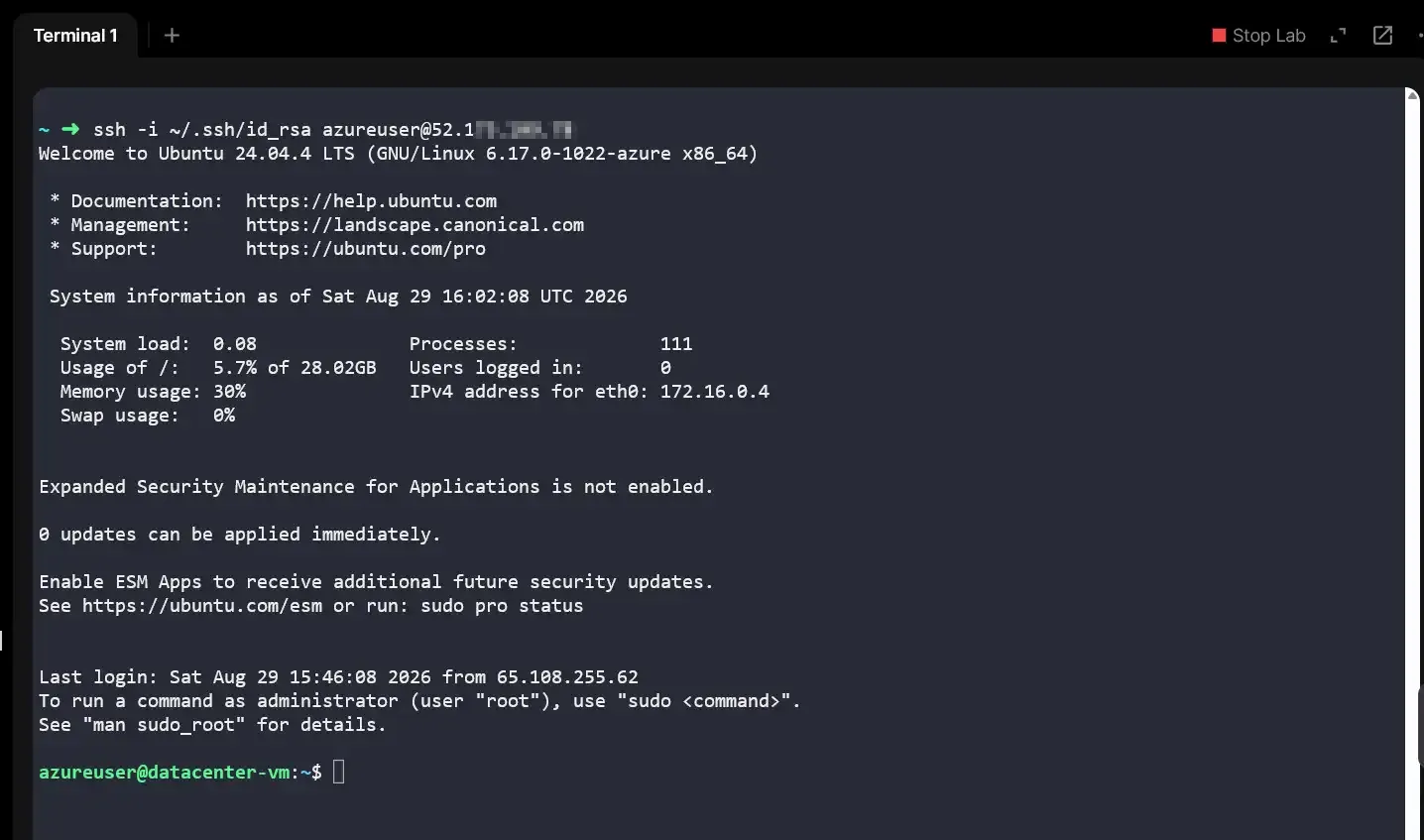
5) Validation
Validation criteria were straightforward:
- VM deployed successfully in
Central US - Public IP resource
datacenter-pipcreated with static allocation - SSH public key injected correctly
- Passwordless SSH access operational
The deployment achieved a secure and repeatable Azure VM provisioning pattern using static networking and client-controlled SSH authentication.