Table of Contents
Open Table of Contents
Résumé pour la direction
Scenario
Dans le cadre d’un besoin de standardisation du déploiement applicatif conteneurisé, l’objectif était de provisionner un registre privé Azure Container Registry (ACR) afin de centraliser le stockage, la versioning et la distribution des images Docker. Cette étape est essentielle pour fiabiliser les chaînes de livraison, réduire la dépendance aux registres publics et préparer l’intégration future avec des services managés comme Azure Container Apps, AKS ou App Service for Containers.
Le besoin portait sur un workflow hybride, combinant la simplicité du Portail Azure pour la création initiale de l’infrastructure et la rapidité de la ligne de commande pour les opérations applicatives. Cette approche répond à un cas d’usage fréquent en environnement de laboratoire, de démonstration ou de transition vers l’Infrastructure as Code, où l’on souhaite garder une traçabilité technique tout en limitant la complexité initiale.
L’infrastructure a été créée dans la région East US avec un registre Basic SKU nommé datacenteracr899172168.
Resolution
Le registre Azure Container Registry a été créé avec succès, puis utilisé comme dépôt privé pour une image conteneur construite localement et publiée en ligne de commande. La validation opérationnelle a confirmé que l’authentification au registre, le build local de l’image et le push vers ACR fonctionnaient conformément à l’objectif.
La valeur délivrée est double : d’une part, une base prête pour industrialiser des déploiements conteneurisés sécurisés dans Azure ; d’autre part, une démonstration concrète d’un modèle hybride pragmatique permettant de passer progressivement d’actions manuelles vers des pratiques plus automatisées et reproductibles.
Technical Implementation
Topology
The implementation used a hybrid operating model separating infrastructure deployment from application lifecycle management:
- Infrastructure provisioning: Azure Portal
- Registry authentication and image publishing: Azure CLI + Docker CLI
- Region: East US
- Registry name:
datacenteracr899172168 - SKU: Basic
- Image context:
/root/pyapp
The architecture is intentionally lightweight. Azure Container Registry acts as the private image repository, while the container image is built on the local workstation and then pushed to Azure.
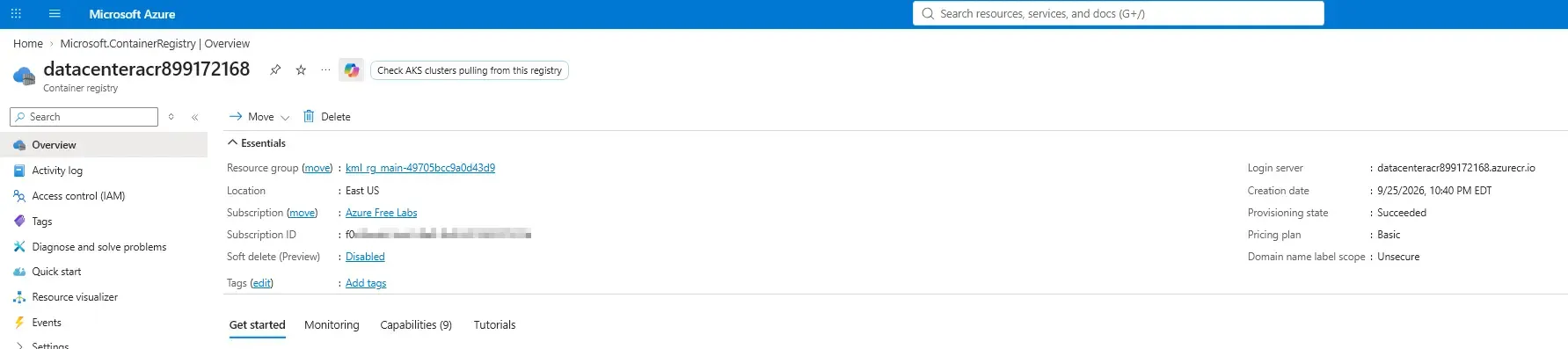
This hybrid workflow (Portal for infrastructure creation, CLI for operational deployment) is a common pattern for proof-of-concept deployments and early-stage DevOps adoption before introducing full CI/CD automation.
Architectural Insight
The traditional approach used in this deployment relies on a local Docker build:
- source code is built on the operator’s machine.
- A local Docker daemon is required.
- The resulting image is tagged and pushed over the network to ACR.
While simple and effective for local development, it assumes the workstation has sufficient compute resources and a running Docker engine.
- Docker installed and running
- sufficient CPU, memory, and disk for image builds
- network access to push image layers to Azure
A more cloud-native, enterprise-grade alternative is using Azure ACR Tasks (az acr build). In that model, the source context is sent directly to Azure, and the image build executes in the cloud.
Benefits of az acr build include:
- No local Docker daemon required.
- Compute constraints are offloaded to Azure.
- Highly consistent builds across environments, avoiding “it works on my machine” issues.
- Seamless integration into CI/CD pipelines (e.g., GitHub Actions, Azure DevOps).
For enterprise delivery pipelines, ACR Tasks generally provide a cleaner operational model, but local builds remain a vital skill for rapid inner-loop iteration and debugging.
Example of the cloud-build model:
az acr build \
  --registry datacenteracr899172168 \
  --image myapp:latest \acr-build.sh
For enterprise delivery pipelines, ACR Tasks generally provide a cleaner operational model because compute is offloaded to Azure, reducing workstation variance and simplifying build automation.
Local Docker builds are useful for fast iteration. ACR Tasks are better aligned with scalable CI/CD and headless cloud execution.
Action
The following steps were executed to complete the deployment workflow. The deployment workflow was executed through a combination of GUI provisioning and precise command-line operations.
1. Provision the Azure Container Registry (Portal)
The Azure Container Registry instance was first created manually in the Azure Portal with these parameters:
- Registry name:
datacenteracr899172168 - Region:
East US - SKU:
Basic
This GUI-based creation step is often acceptable for isolated labs or initial validation. In production, the same resource should typically be deployed using IaC tools such as Bicep, Terraform, or Azure CLI scripts.
Manual provisioning is fast for testing, but it should be replaced by repeatable IaC definitions for controlled environments.
2. Authenticate to Azure Container Registry
After the registry was provisioned, operations shifted to the terminal. The following execution log demonstrates the end-to-end process of authenticating to Azure, building the container directly with its Fully Qualified Domain Name (FQDN) tag, and pushing it to the remote registry.
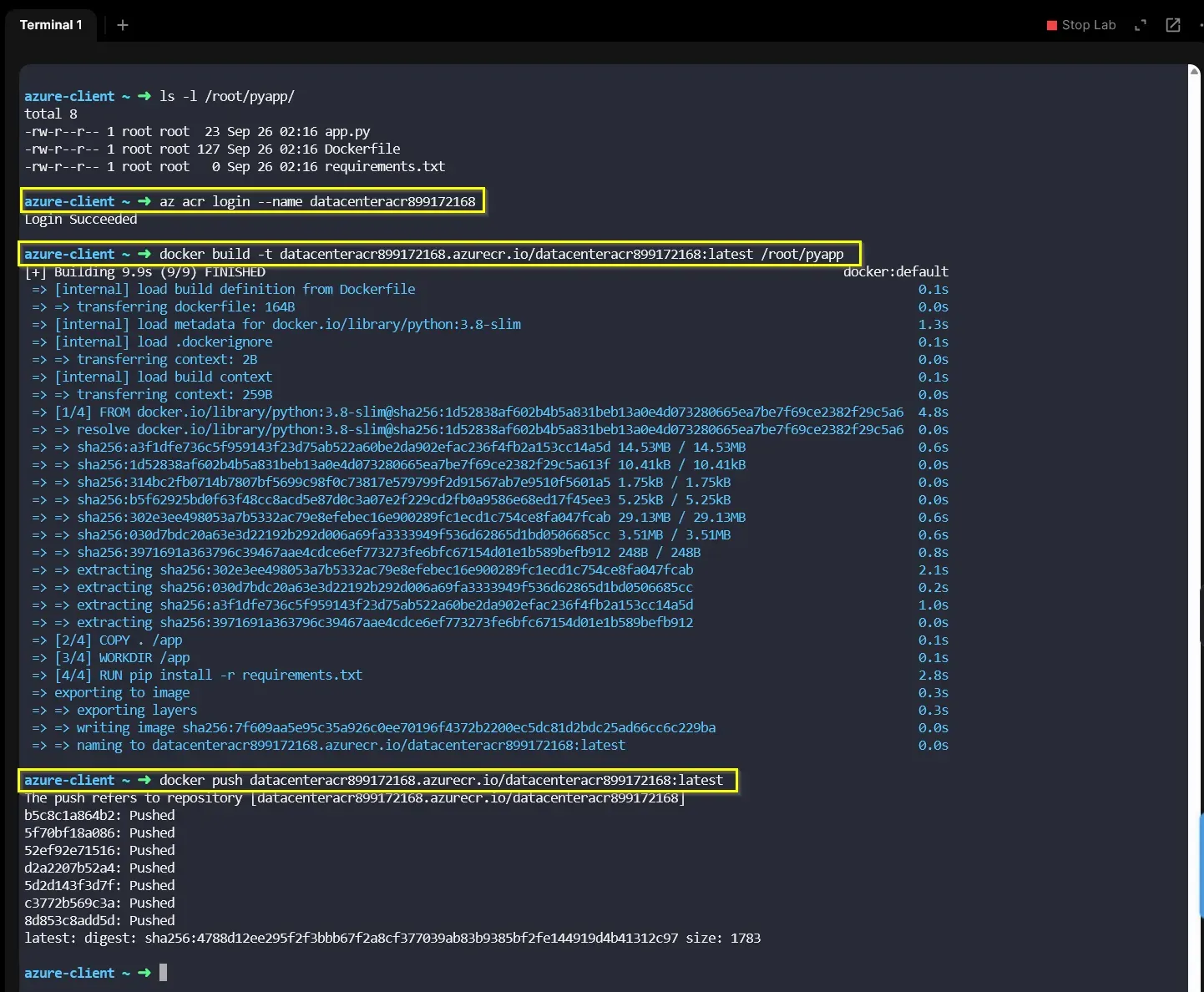
The process maps to three precise commands:
az acr login --name datacenteracr899172168acr-login.shThis command seamlessly retrieves an authentication token using the active Azure CLI session and configures the local Docker daemon to access the private registry.
3. Build and Tag the Image
Instead of building and tagging in two separate steps, the image was built and tagged simultaneously using the ACR login server address.
docker build -t datacenteracr899172168.azurecr.io/datacenteracr899172168:latest /root/pyappdocker-build.sh4. Push to Azure Container Registry
The local image was then pushed to the managed registry in Azure.
docker push datacenteracr899172168.azurecr.io/datacenteracr899172168:latestpush-to-azure.shOnce the push completed, the image became available in the private registry for downstream deployment targets.
6. Optional verification
A quick validation can be performed by listing repositories or tags in the registry:
az acr repository list \
  --name datacenteracr899172168 \
--output tableacr-verify.shThe successful Pushed state of all image layers confirms that the registry provisioning, client authentication, and image publication were executed flawlessly.