Table of Contents
Open Table of Contents
Résumé pour la direction
Scenario
L’équipe DevOps Nautilus avait besoin d’un Network Security Group (NSG) de référence pour encadrer les flux réseau entrants des futurs workloads applicatifs dans Azure. L’objectif était de mettre en place un contrôle initial simple, lisible et réutilisable, afin d’autoriser uniquement les protocoles explicitement requis par le socle technique.
Dans ce contexte, deux besoins d’accès ont été définis :
- HTTP / TCP 80 pour l’exposition applicative de base
- SSH / TCP 22 pour l’administration distante
Cette opération répond à un besoin classique de segmentation réseau minimale, tout en préparant l’industrialisation future des déploiements cloud et l’alignement avec les pratiques de sécurité d’entreprise.
Resolution
Le NSG xfusion-nsg a été créé avec succès dans le groupe de ressources kml_rg_main-202650c067be4ed9 en région East US. Deux règles entrantes ont été ajoutées et validées :
- Allow-HTTP avec priorité 100
- Allow-SSH avec priorité 110
Le résultat fournit un composant réseau de base immédiatement exploitable pour de futurs déploiements, avec une configuration claire, vérifiable et compatible avec une approche d’automatisation via Azure CLI et PowerShell.
Technical Implementation
Topology
The implementation targets an Azure Network Security Group deployed in the following scope:
- Resource Group:
kml_rg_main-202650c067be4ed9 - Region:
East US - NSG Name:
xfusion-nsg
Inbound access requirements were defined as:
- Allow-HTTP
- Protocol:
TCP - Destination Port:
80 - Source:
0.0.0.0/0 - Priority:
100
- Protocol:
- Allow-SSH
- Protocol:
TCP - Destination Port:
22 - Source:
0.0.0.0/0 - Priority:
110
- Protocol:
This is a straightforward NSG-only deployment and is well suited for headless / CLI-first execution, even if the original validation was performed in the Azure Portal.
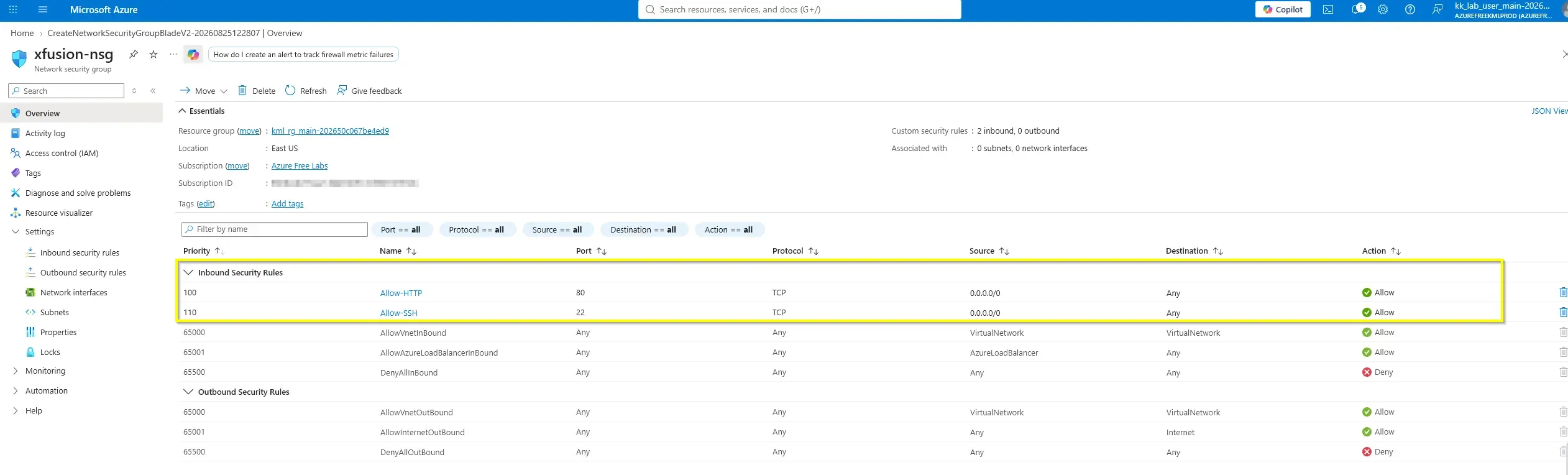
Allowing SSH (22) and HTTP (80) from 0.0.0.0/0 exposes these services to the public internet. While acceptable for a lab or baseline exercise, production architecture should prefer restricted source IP ranges, Azure Bastion for administrative access, Just-In-Time VM access, and HTTPS (443) instead of plain HTTP wherever possible.
100 is applied before 110.Action
The portal-based task can be translated into concise, repeatable automation using either Azure CLI or Azure PowerShell. The sequence is simple:
- Create the NSG.
- Append the HTTP inbound rule.
- Append the SSH inbound rule.
- Validate the resulting rule set.
Azure CLI
RG="kml_rg_main-202650c067be4ed9"
LOCATION="eastus"
NSG="xfusion-nsg"

az network nsg create \
  --resource-group "$RG" \
  --name "$NSG" \
  --location "$LOCATION"

az network nsg rule create \
  --resource-group "$RG" \
  --nsg-name "$NSG" \
  --name "Allow-HTTP" \
  --priority 100 \
  --direction Inbound \
  --access Allow \
  --protocol Tcp \
  --source-address-prefixes "*" \
  --source-port-ranges "*" \
  --destination-address-prefixes "*" \
  --destination-port-ranges 80

az network nsg rule create \
  --resource-group "$RG" \
  --nsg-name "$NSG" \
  --name "Allow-SSH" \
  --priority 110 \
  --direction Inbound \
  --access Allow \
  --protocol Tcp \
  --source-address-prefixes "*" \
  --source-port-ranges "*" \
  --destination-address-prefixes "*" \
  --destination-port-ranges 22create-nsg-rules.sh
Azure PowerShell
$ResourceGroupName = "kml_rg_main-202650c067be4ed9"
$Location = "East US"
$NsgName = "xfusion-nsg"

$nsg = New-AzNetworkSecurityGroup `
  -ResourceGroupName $ResourceGroupName `
  -Location $Location `
  -Name $NsgName

$nsg | Add-AzNetworkSecurityRuleConfig `
  -Name "Allow-HTTP" `
  -Description "Allow HTTP inbound" `
  -Access Allow `
  -Protocol Tcp `
  -Direction Inbound `
  -Priority 100 `
  -SourceAddressPrefix "*" `
  -SourcePortRange "*" `
  -DestinationAddressPrefix "*" `
  -DestinationPortRange 80 | Out-Null

$nsg | Add-AzNetworkSecurityRuleConfig `
  -Name "Allow-SSH" `
  -Description "Allow SSH inbound" `
  -Access Allow `
  -Protocol Tcp `
  -Direction Inbound `
  -Priority 110 `
  -SourceAddressPrefix "*" `
  -SourcePortRange "*" `
  -DestinationAddressPrefix "*" `
  -DestinationPortRange 22 | Out-Null

$nsg | Set-AzNetworkSecurityGroupcreate-nsg-rules.ps1
Validation Commands
az network nsg rule list \
  --resource-group "kml_rg_main-202650c067be4ed9" \
  --nsg-name "xfusion-nsg" \
  --output tablevalidate-nsg-rules.sh
Get-AzNetworkSecurityGroup `
-ResourceGroupName "kml_rg_main-202650c067be4ed9" `
-Name "xfusion-nsg" |
Select-Object -ExpandProperty SecurityRules |
Format-Table Name, Priority, Direction, Access, Protocol, SourceAddressPrefix, DestinationPortRangevalidate-nsg-rules.ps1