Table of Contents
Open Table of Contents
Résumé pour la direction
Scenario
L’équipe Nautilus DevOps devait appliquer une stratégie de marquage normalisée sur une infrastructure migrée afin de répondre aux exigences de gouvernance cloud. L’objectif était d’ajouter une métadonnée métier exploitable pour la conformité, la ventilation des coûts FinOps et l’administration opérationnelle des ressources.
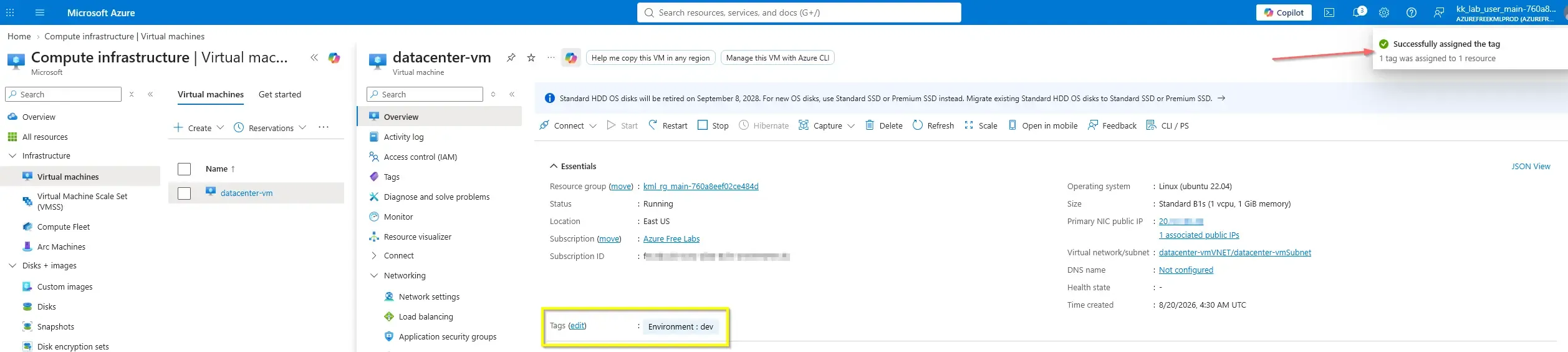
Dans ce cas, la machine virtuelle datacenter-vm, hébergée dans le groupe de ressources kml_rg_main-760a8eef02ce484d, devait recevoir le tag Environment=dev. Cette opération est nécessaire pour garantir une identification cohérente des environnements, faciliter les rapports de consommation et renforcer les contrôles de gestion du parc Azure.
Resolution
Le tag Environment=dev a été appliqué avec succès à la machine virtuelle ciblée, puis validé afin de confirmer la mise à jour correcte des métadonnées. Le résultat place la ressource en conformité avec la stratégie de tagging de l’organisation, tout en améliorant la lisibilité opérationnelle et la qualité des données de gouvernance.
datacenter-vm est désormais alignée avec les standards de gouvernance Azure de l’organisation grâce à l’ajout du tag requis.Technical Implementation
Topology
The target resource was an Azure Virtual Machine named datacenter-vm deployed in the resource group kml_rg_main-760a8eef02ce484d. The required metadata update was to apply the tag key Environment with the value dev.
This task was initially completed through the Azure Portal, but the operationally preferred approach is headless execution using Azure CLI or Azure PowerShell for repeatability, auditability, and easier integration into IaC or automation pipelines.
Resource scope:
- Resource Group:
kml_rg_main-760a8eef02ce484d - Virtual Machine:
datacenter-vm - Tag Key:
Environment - Tag Value:
dev
Action
The portal-based update validated the functional requirement, but production-grade operations should use scriptable methods. The key requirement from an automation perspective is to append the new tag without deleting existing metadata already assigned to the VM.
Azure CLI
The modern Azure CLI approach utilizes the native az tag update command with the Merge operation. This is the safest and most efficient method.
#!/usr/bin/env bash
set -euo pipefail

RESOURCE_GROUP="kml_rg_main-760a8eef02ce484d"
VM_NAME="datacenter-vm"
TAG_KEY="Environment"
TAG_VALUE="dev"

# 1. Retrieve the Resource ID
RESOURCE_ID="$(az vm show \
  --resource-group "$RESOURCE_GROUP" \
  --name "$VM_NAME" \
  --query id \
  --output tsv)"

# 2. Safely merge the new tag using native Azure CLI operations
az tag update \
  --resource-id "$RESOURCE_ID" \
  --operation Merge \
  --tags "$TAG_KEY=$TAG_VALUE" \
  --output tableapply-vm-tag-merge.sh
Azure PowerShell
Similarly, modern Azure PowerShell provides the Update-AzTag cmdlet. Using the Merge operation negates the need to manually iterate through existing tags via hashtables.
$ResourceGroupName = "kml_rg_main-760a8eef02ce484d"
$VmName = "datacenter-vm"
$TagKey = "Environment"
$TagValue = "dev"

# 1. Retrieve the Virtual Machine object
$vm = Get-AzVM -ResourceGroupName $ResourceGroupName -Name$VmName

# 2. Safely merge the new tag using native Azure PowerShell operations
Update-AzTag -ResourceId $vm.Id -Tag @{$TagKey=$TagValue} -Operation MergeApply-VmTagMerge.ps1Never use az resource update --set tags or Set-AzResource -Tag directly without retrieving existing tags first, as these legacy commands perform a hard overwrite (Replace) and will silently delete all pre-existing metadata.
Validation
After execution, validation should confirm that the VM still retains any pre-existing tags and that the Environment:dev tag is successfully appended.
CLI validation:
az vm show \
  --resource-group "kml_rg_main-760a8eef02ce484d" \
  --name "datacenter-vm" \
  --query tags \
  --output jsonvalidate-vm-tags.sh
PowerShell validation:
(Get-AzVM -ResourceGroupName "kml_rg_main-760a8eef02ce484d" -Name "datacenter-vm").TagsValidate-VmTags.ps1