Table of Contents
Open Table of Contents
Résumé pour la direction
Scenario
Dans le cadre de la stratégie de migration cloud progressive de l’équipe Nautilus DevOps, il était nécessaire de mettre en place une fondation réseau isolée dans Azure. L’objectif principal consistait à créer un réseau virtuel dédié ainsi qu’un sous-réseau associé afin de préparer l’intégration future de ressources de calcul, tout en conservant une séparation claire des flux réseau.
Cette étape est importante pour standardiser l’architecture de base, améliorer la gouvernance réseau et réduire les risques liés à l’exposition non contrôlée des futures charges de travail. Elle s’inscrit également dans une logique de préparation à l’industrialisation des déploiements cloud.
Resolution
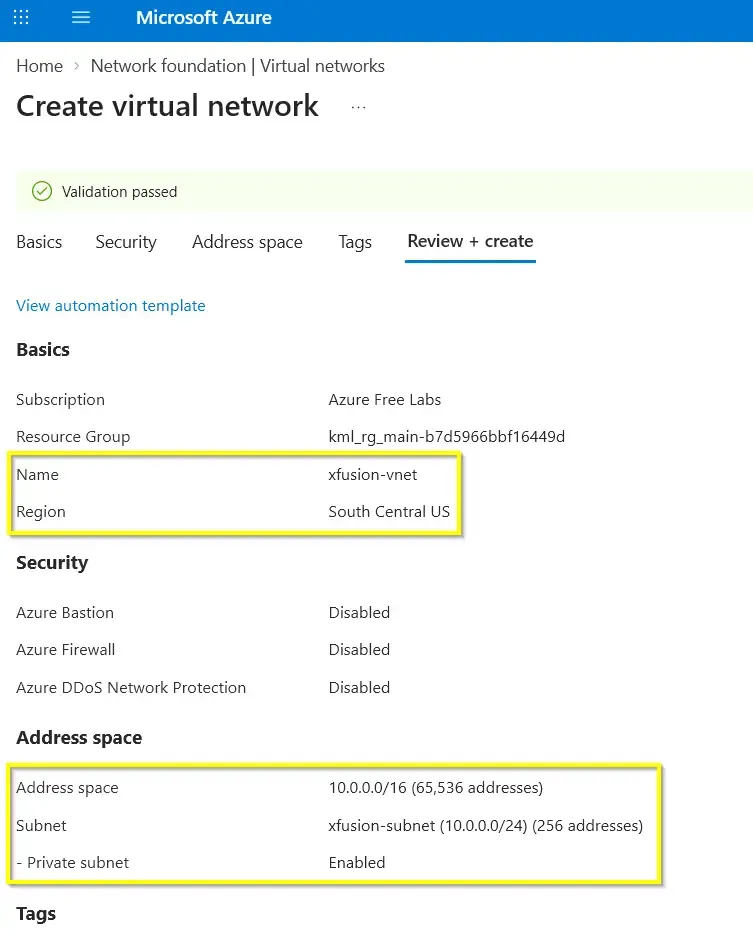
Le réseau virtuel xfusion-vnet a été provisionné avec succès dans la région South Central US, avec l’espace d’adressage 10.0.0.0/16, ainsi que le sous-réseau dédié xfusion-subnet. La validation du déploiement a confirmé que la base réseau est opérationnelle et prête à accueillir les prochaines ressources de l’environnement.
La valeur métier apportée est immédiate : l’équipe dispose désormais d’un périmètre réseau sécurisé, structuré et extensible, aligné avec une montée en charge progressive des usages cloud.
Technical Implementation
Topology
The deployment targeted South Central US and established a dedicated Azure Virtual Network for the Nautilus DevOps migration baseline.
Provisioned parameters:
- Virtual Network Name:
xfusion-vnet - Address Space:
10.0.0.0/16 - Subnet Name:
xfusion-subnet
This is a straightforward foundational network build intended for future workload onboarding. The design keeps the network layer simple and clean, which is appropriate for early-stage cloud migration patterns.
Action
The implementation consisted of provisioning a new Virtual Network and defining a dedicated subnet during creation. For this type of task, using command-line tooling is preferable over manual portal configuration because it improves repeatability, auditability, and future CI/CD integration.
A concise IaC-minded approach was used:
- Define the target region.
- Create the Virtual Network with the required IPv4 address space.
- Create the subnet as part of the VNet provisioning workflow.
- Validate the deployed network configuration.
Azure CLI
az network vnet create \
  --resource-group <RESOURCE_GROUP_NAME> \
  --name xfusion-vnet \
  --location southcentralus \
  --address-prefixes 10.0.0.0/16 \
  --subnet-name xfusion-subnet \
  --subnet-prefixes 10.0.0.0/24provision-vnet-subnet.sh
Azure PowerShell
New-AzVirtualNetwork `
  -ResourceGroupName "<RESOURCE_GROUP_NAME>" `
  -Name "xfusion-vnet" `
  -Location "South Central US" `
  -AddressPrefix "10.0.0.0/16" `
  -Subnet @(New-AzVirtualNetworkSubnetConfig -Name "xfusion-subnet" -AddressPrefix "10.0.0.0/24")provision-vnet-subnet.ps1
When designing IP address spaces in Azure, a critical consideration is understanding Azure’s native IP allocation mechanics.
Even though a /24 subnet theoretically provides 256 IP addresses (from 10.0.0.0 to 10.0.0.255), Azure permanently reserves 5 IP addresses within every subnet for internal network management. Therefore, a /24 subnet yields exactly 251 usable IPs.
The reserved IPs are always:
x.x.x.0: Network addressx.x.x.1: Azure Default Gatewayx.x.x.2&x.x.x.3: Azure DNS orchestrationx.x.x.255: Network Broadcast (though broadcast is not supported in Azure VNets, the IP is still reserved)
Best Practice: Always calculate the workload capacity based on (2^n) - 5 to avoid IP exhaustion, especially when deploying scaling services like Azure Kubernetes Service (AKS) or Virtual Machine Scale Sets (VMSS).