Table of Contents
Open Table of Contents
Résumé pour la direction
Scenario
L’équipe Nautilus DevOps avait besoin de provisionner une nouvelle machine virtuelle Linux dans Azure pour répondre à un besoin opérationnel immédiat. Dans ce contexte, l’accès au portail Azure était restreint, ce qui imposait une approche entièrement en ligne de commande depuis l’hôte azure-client.
Cette contrainte a renforcé une pratique alignée avec les standards modernes d’exploitation cloud : privilégier une gestion headless et orientée Infrastructure as Code plutôt qu’une administration manuelle par interface graphique. L’objectif était de déployer rapidement une VM conforme aux paramètres demandés, tout en garantissant la traçabilité de l’action, la reproductibilité du processus et la validation de l’état final de la ressource.
Les exigences transmises étaient les suivantes :
- Nom de la VM :
devops-vm - Système :
Ubuntu2204 - Taille :
Standard_B2s - Compte administrateur :
azureuser - Authentification : génération de clé SSH
- Disque OS :
30 GB Standard_LRS - État attendu après création :
Running
Resolution
Le déploiement a été réalisé avec succès via Azure CLI après une phase de reconnaissance de l’environnement afin d’identifier le groupe de ressources affecté. La commande az vm create a permis de créer la machine virtuelle demandée sans dépendre du portail Azure, démontrant la capacité à administrer l’environnement de manière automatisée et headless.
La validation finale a été effectuée à partir de la sortie JSON de la commande, confirmant que la VM devops-vm était bien provisionnée et en état de fonctionnement. D’un point de vue métier, cette opération apporte trois bénéfices directs : une meilleure standardisation des déploiements, une réduction de la dépendance aux interfaces graphiques et une transition concrète vers une gestion cloud plus scriptable, gouvernable et industrialisable.
Technical Implementation
Topology
This task was executed as a CLI-only Azure administration workflow from the azure-client host, with no dependency on the Azure Portal. The implementation goal was to provision a Linux virtual machine using native Azure CLI capabilities while keeping the command concise and aligned with Azure’s implicit resource handling model.
The target VM configuration was:
- VM name:
devops-vm - Image:
Ubuntu2204 - Size:
Standard_B2s - Admin username:
azureuser - Authentication: auto-generated SSH key pair
- OS disk:
30 GB - Storage SKU:
Standard_LRS - Required runtime state:
Running
Because the lab notes indicate that resource group discovery was required beforehand, the workflow began with environment reconnaissance and then moved directly to VM creation. This is a strong example of transitioning from GUI-based cloud administration to repeatable command-line provisioning.
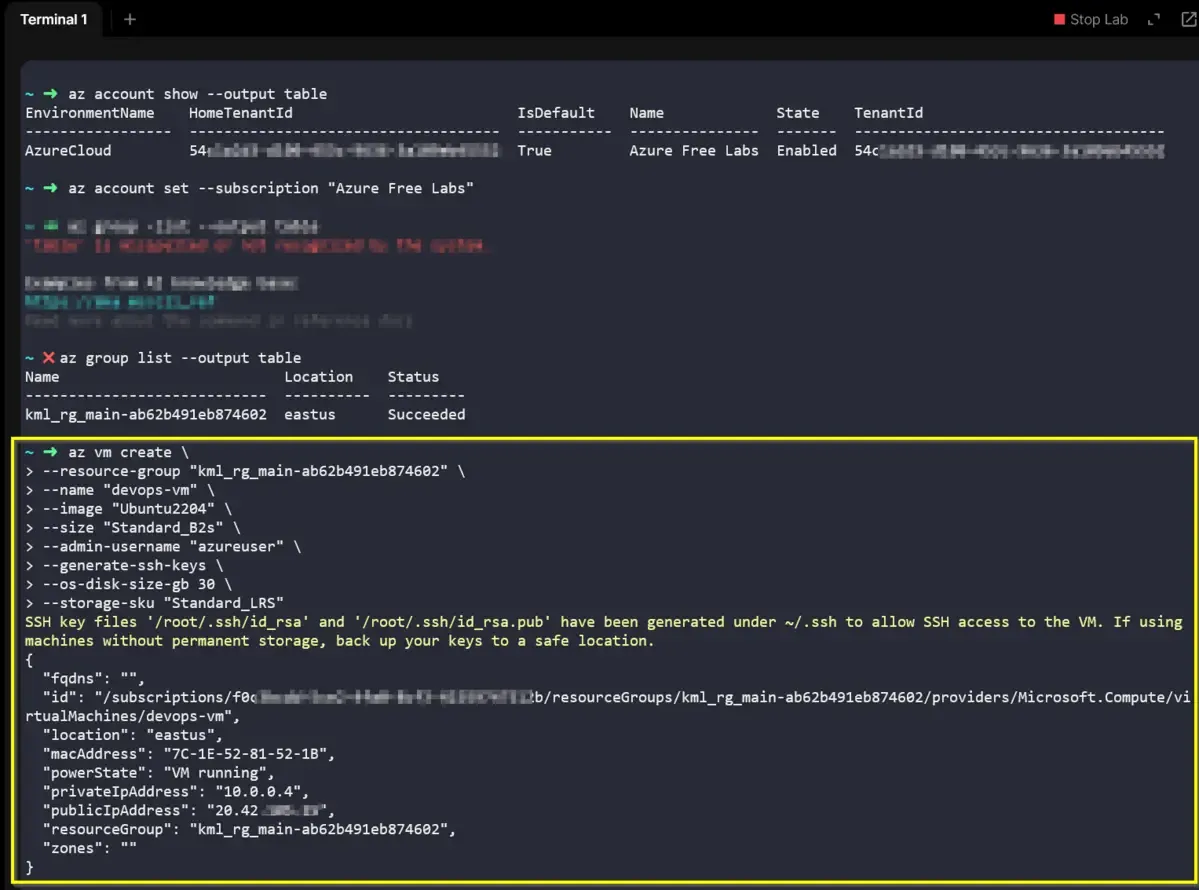
Azure CLI can implicitly create supporting resources such as networking components when they are not explicitly pre-defined, which helps keep lab provisioning efficient and idiomatic.
The exact resource group name was discovered dynamically in the environment before running the deployment command.
Action
The implementation followed two clear phases: identify the correct target resource group, then create the VM using a single Azure CLI command.
First, the environment was inspected from the azure-client host to determine the assigned resource group.
az group list --output tablerecon-resource-group.shAfter identifying the correct resource group, the VM was provisioned with the exact required parameters. The command below reflects the requested headless Azure management approach and the explicit transition from portal-based administration to CLI-driven provisioning.
az vm create \
  --resource-group <RESOURCE_GROUP_NAME> \
  --name devops-vm \
  --image Ubuntu2204 \
  --size Standard_B2s \
  --admin-username azureuser \
  --generate-ssh-keys \
  --os-disk-size-gb 30 \
  --storage-sku Standard_LRScreate-devops-vm.sh
This approach intentionally avoids over-engineering. Rather than manually pre-creating every dependent component, it leverages the native behavior of az vm create to provision the required infrastructure when not otherwise specified.
Once the deployment completed, the JSON response was reviewed to verify successful provisioning and confirm that the VM was created in the expected running state.
az vm get-instance-view \
  --resource-group <RESOURCE_GROUP_NAME> \
  --name devops-vm \
  --query "instanceView.statuses[].displayStatus" \
--output tablevalidate-vm-state.shThe provisioning completed successfully, and the command output confirmed that the virtual machine was running.
Replace <RESOURCE_GROUP_NAME> with the actual resource group discovered in the lab before executing the creation command.
SSH private keys generated during provisioning must be protected and never exposed in shared repositories or unsecured systems.
Once the virtual machine was confirmed to be in a running state, the final operational requirement was to validate remote administrative access. Standard Linux security protocols dictate that the SSH Daemon will reject connections if the private key file is overly permissive.
The following steps demonstrate the retrieval of the dynamic Public IP, the enforcement of strict file permissions for the private key, and the successful establishment of the SSH session.
# 1. Retrieve the dynamically assigned Public IP
az vm show \
  --resource-group <RESOURCE_GROUP_NAME> \
  --name devops-vm \
  --show-details \
  --query publicIps \
  --output tsv

# 2. Enforce strict security permissions on the private key (Required by SSH Daemon)
chmod 600 ~/.ssh/id_rsa

# 3. Establish the secure connection
ssh -i ~/.ssh/id_rsa azureuser@<PUBLIC_IP_ADDRESS>secure-ssh-access.sh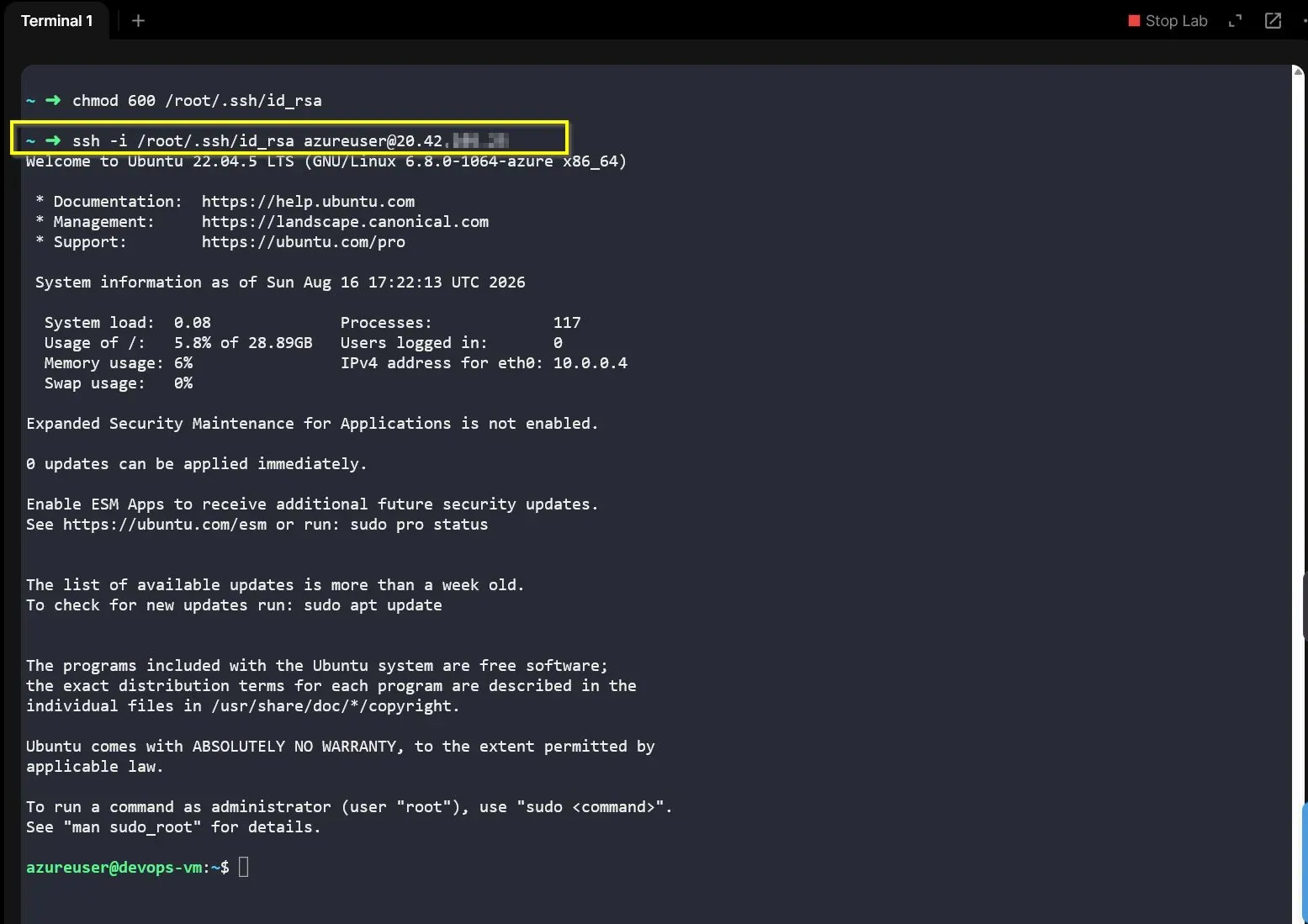
The SSH session was successfully established, providing absolute proof that the network routing, implicit NSG rules (Port 22), and compute resources are fully functional.
Executing chmod 600 ensures that only the file owner has read and write permissions. Omitting this step usually results in a WARNING: UNPROTECTED PRIVATE KEY FILE! error, preventing access.