Table of Contents
Open Table of Contents
Résumé pour la direction
Scenario
L’équipe Nautilus DevOps a identifié un goulot d’étranglement de performance sur la machine virtuelle devops-vm à la suite d’une augmentation de charge. Dans ce contexte, une mise à l’échelle verticale était nécessaire afin d’allouer davantage de ressources de calcul sans modifier l’architecture applicative existante.
L’objectif métier était simple : restaurer rapidement un niveau de performance acceptable, réduire le risque de dégradation de service et maintenir la continuité des opérations dans la région South Central US. Cette approche est particulièrement adaptée lorsque la saturation provient d’une insuffisance de capacité CPU/mémoire sur une instance déjà en production.
Resolution
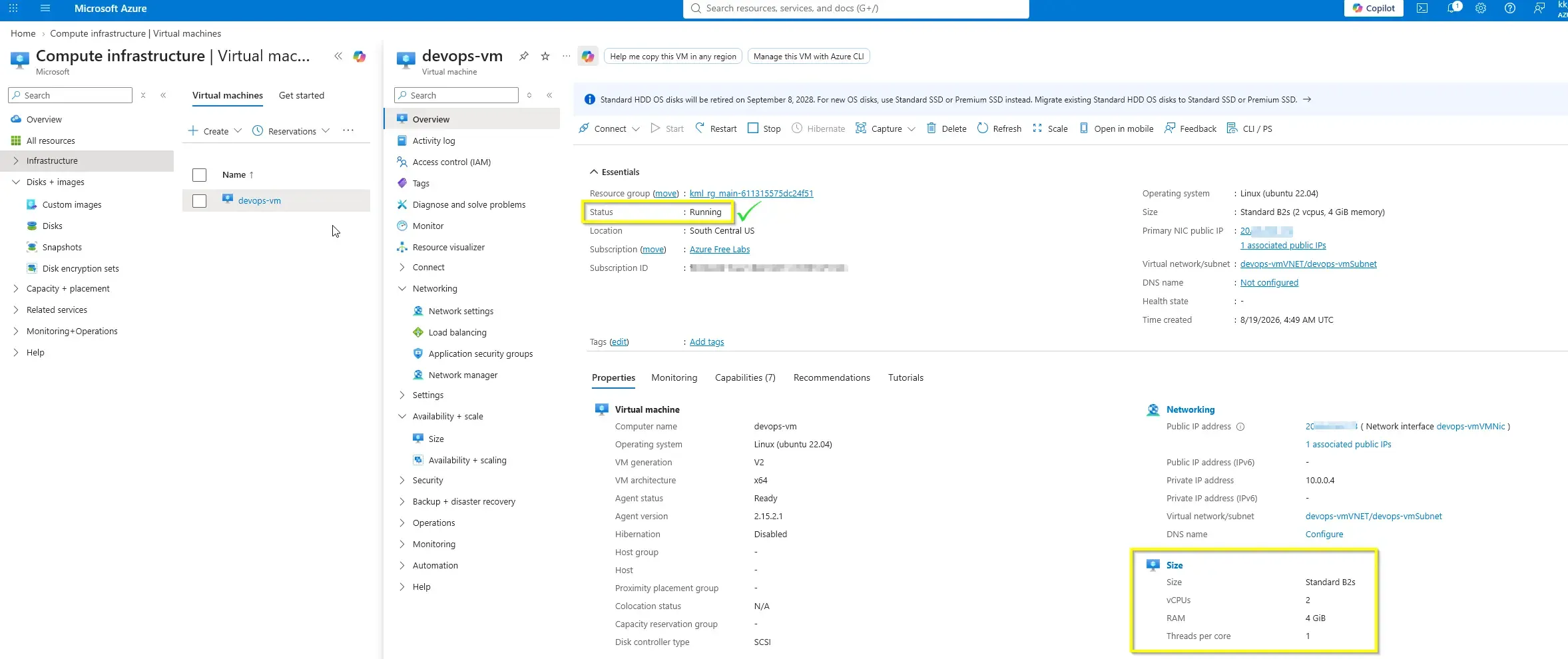
La machine virtuelle devops-vm a été redimensionnée avec succès depuis le SKU Standard_B1s vers Standard_B2s. L’opération de réallocation s’est déroulée correctement, et l’état final de la ressource a été vérifié comme Running.
Ce changement a permis de supprimer le point de contention identifié, tout en conservant l’environnement existant et en limitant l’impact opérationnel. La validation finale confirme que la VM dispose désormais d’une capacité de calcul supérieure, mieux alignée avec la charge de travail actuelle.
Technical Implementation
Topology
The target workload was hosted on an existing Azure Virtual Machine with the following parameters:
- Region: South Central US
- VM Name:
devops-vm - Scaling Type: Vertical scaling (resize / scale-up)
- Previous SKU:
Standard_B1s - New SKU:
Standard_B2s - Expected Final State:
Running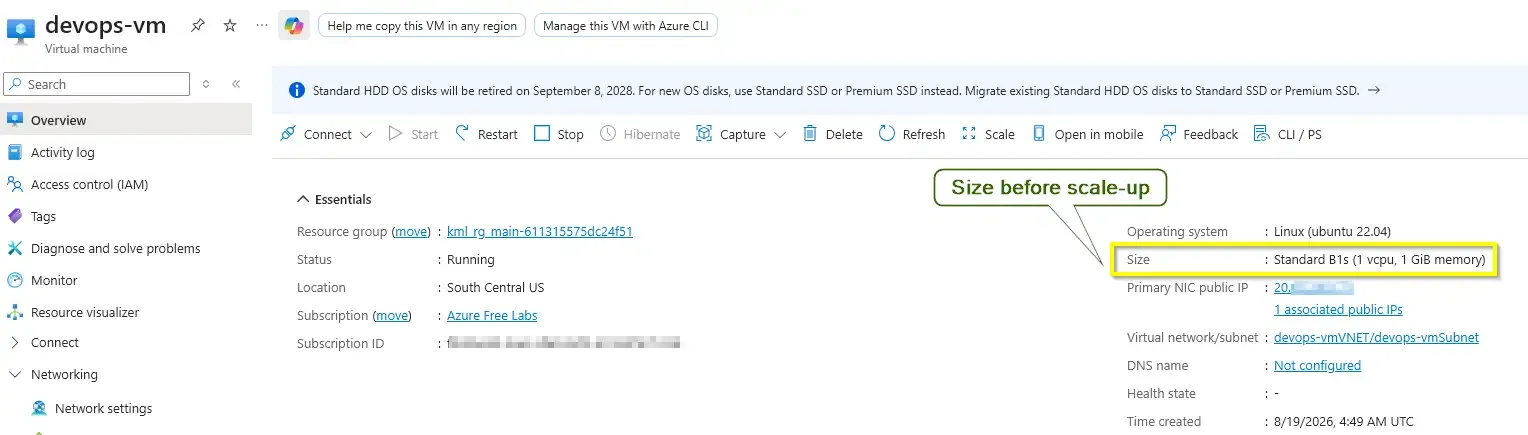
This was a straightforward compute resize operation on an already deployed VM. From an architectural standpoint, no application redesign, network reconfiguration, or storage migration was required. The scope was limited to changing the VM size to increase available compute capacity.
Vertical scaling of an Azure VM typically requires a restart or deallocation/reallocation cycle. Plan the operation during an approved maintenance window to avoid unexpected service disruption.
Action
The resize was completed successfully through the Azure Portal, then mapped to concise Infrastructure as Code style commands for repeatability and operational standardization.
It is crucial to communicate to stakeholders that Vertical Scaling (Scale-Up) always incurs downtime, as the hypervisor must reallocate the VM to a physical host cluster that supports the new hardware profile. For mission-critical, zero-downtime applications, cloud architects prefer Horizontal Scaling (Scale-Out) using Virtual Machine Scale Sets (VMSS) behind a Load Balancer.
Azure CLI
Use az vm resize to change the VM SKU directly.
RESOURCE_GROUP="<resource-group>"
VM_NAME="devops-vm"
NEW_SIZE="Standard_B2s"

az vm resize \
  --resource-group "$RESOURCE_GROUP" \
  --name "$VM_NAME" \
  --size "$NEW_SIZE"resize-vm.sh
To validate the resulting VM size and power state:
RESOURCE_GROUP="<resource-group>"
VM_NAME="devops-vm"

az vm show \
  --resource-group "$RESOURCE_GROUP" \
  --name "$VM_NAME" \
  --show-details \
  --query "{name:name,size:hardwareProfile.vmSize,powerState:powerState}" \
  --output tablevalidate-vm-resize.sh
Azure PowerShell
Use Update-AzVM after updating the VM size property.
$ResourceGroupName = "<resource-group>"
$VmName = "devops-vm"
$NewSize = "Standard_B2s"

$vm = Get-AzVM -ResourceGroupName $ResourceGroupName -Name $VmName
$vm.HardwareProfile.VmSize = $NewSize
Update-AzVM -ResourceGroupName $ResourceGroupName -VM $vmResize-VM.ps1
To validate the resize and runtime state:
$ResourceGroupName = "<resource-group>"
$VmName = "devops-vm"

Get-AzVM -ResourceGroupName $ResourceGroupName -Name $VmName -Status |
  Select-Object Name,
                @{Name="VmSize";Expression={$_.HardwareProfile.VmSize}},
@{Name="PowerState";Expression={($_.Statuses | Where-Object Code -like "PowerState/*").DisplayStatus}}Validate-VMResize.ps1The portal-based operation is suitable for one-off administration, but the CLI and PowerShell versions provide a cleaner path for repeatable runbooks, automation pipelines, and change-controlled infrastructure workflows.
The VM was successfully resized from Standard_B1s to Standard_B2s, reallocated onto the upgraded compute tier, and verified in the Running state.