Table of contents
Open Table of contents
Résumé pour la direction (French)
Scenario
Dans le cadre d’une migration incrémentale vers Microsoft Azure, l’équipe Nautilus DevOps devait mettre en place un mécanisme d’accès sécurisé pour accompagner les opérations de transition. L’objectif principal était de réduire les risques liés à l’authentification, d’aligner le déploiement sur les bonnes pratiques de sécurité, et de préparer les futurs accès administrateurs aux ressources cloud.
La demande portait sur la génération d’une paire de clés SSH dédiée dans Azure, avec les caractéristiques suivantes :
- Groupe de ressources :
kml_rg_main-ff98e182a44e4cc2 - Région :
East US - Nom de la paire de clés :
datacenter-kp - Type de clé :
RSA
Cette étape était nécessaire pour garantir un accès distant sécurisé aux ressources qui utiliseront une authentification par clé publique, tout en respectant la contrainte de sécurité selon laquelle la clé privée doit rester exclusivement côté client.
Resolution
La paire de clés SSH RSA a été générée avec succès via le portail Azure, puis validée sans erreur. La clé privée au format .pem a été téléchargée et conservée localement, conformément au modèle de sécurité Azure, qui ne stocke pas la clé privée.
Le résultat apporte plusieurs bénéfices immédiats :
- sécurisation des futurs accès administratifs,
- réduction de l’exposition aux mots de passe traditionnels,
- préparation d’un socle conforme pour la migration progressive,
- possibilité d’industrialiser la même opération via Azure CLI ou Azure PowerShell.
La création de la paire de clés SSH a été validée avec succès et répond aux exigences de sécurité de la migration incrémentale Azure.
Technical Implementation (English)
Topology
The implementation was intentionally lightweight and focused on secure identity material generation for future VM or service access within Azure.
The deployed configuration included:
- Resource Group:
kml_rg_main-ff98e182a44e4cc2 - Region:
East US - SSH Key Resource Name:
datacenter-kp - Key Algorithm:
RSA
From an architectural perspective, the Azure SSH public key resource is stored in the target resource group and can later be referenced by virtual machines or automation workflows. The private key is generated once and downloaded by the operator during creation, which ensures that Azure does not retain sensitive private-key material.
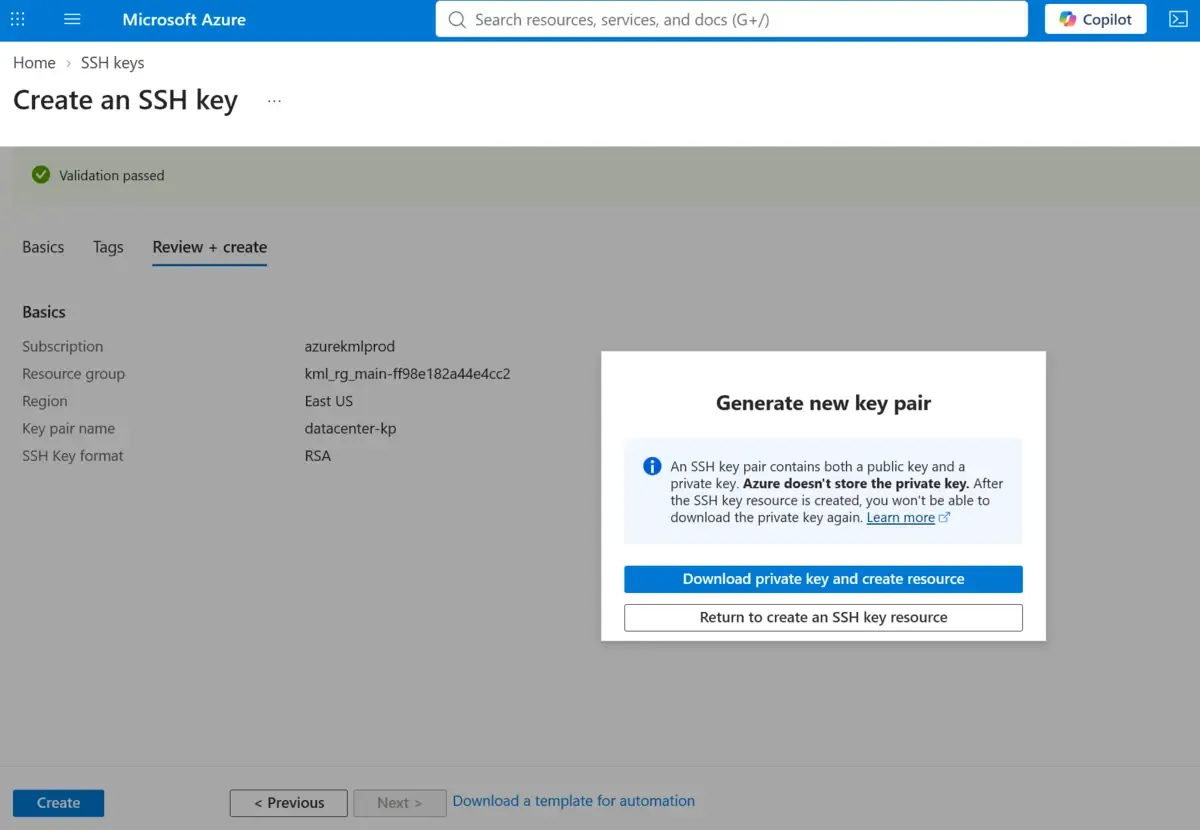
Azure stores the public SSH key as a managed resource, but the private .pem key must be secured on the client side immediately after download.
Action
The SSH key pair was created successfully through the Azure Portal using the required migration parameters:
- Open the Azure Portal.
- Navigate to the SSH key creation workflow.
- Select the target Resource Group:
kml_rg_main-ff98e182a44e4cc2 - Set the Location to
East US - Enter the Key Pair Name:
datacenter-kp - Choose RSA as the key type
- Create the resource and download the generated private key file (
.pem) - Confirm that the resource was provisioned successfully in Azure
Validation confirmed that the SSH key resource was available in the resource group and that the private key download was completed during provisioning.
If the private key is not downloaded and stored securely at creation time, it cannot be retrieved later from Azure.
For repeatable deployments, the same configuration can be provisioned through Infrastructure as Code or command-line automation.
az sshkey create \
  --name "datacenter-kp" \
  --resource-group "kml_rg_main-ff98e182a44e4cc2" \
  --location "eastus"create-ssh-key.sh
New-AzSshKey `
-ResourceGroupName "kml_rg_main-ff98e182a44e4cc2" `
-Name "datacenter-kp" `
-Location "EastUS"create-ssh-key.ps1Using Azure CLI or Azure PowerShell helps standardize key provisioning across migration waves and reduces manual configuration drift.