Table of contents
Open Table of contents
Résumé pour la direction
Scenario
Dans le cadre de la migration progressive de l’environnement DevOps de Nautilus vers Azure, il était nécessaire de mettre en place une première brique d’infrastructure de calcul simple, fiable et rapidement exploitable. L’objectif principal consistait à déployer une machine virtuelle Linux standardisée afin de fournir un point d’entrée opérationnel pour les futurs usages d’administration, d’automatisation et d’hébergement d’outils techniques.
Les exigences initiales étaient les suivantes :
- déployer la ressource dans Azure avec une configuration légère et économique ;
- utiliser une distribution Linux moderne et maintenue ;
- autoriser l’administration distante sécurisée via SSH ;
- valider immédiatement la disponibilité opérationnelle de la VM.
Cette étape était importante pour réduire le risque technique de la migration, établir une base cohérente pour les prochains déploiements et confirmer la capacité de l’équipe à provisionner rapidement des ressources cloud conformes aux besoins du programme.
Resolution
La machine virtuelle devops-vm a été déployée avec succès dans le groupe de ressources kml_rg_main-7e48a826441b4826 en région West US avec l’image Ubuntu 24.04 LTS, le format Standard_B1s et un disque système Standard HDD de 30 Go.
L’accès d’administration a été sécurisé par l’ouverture contrôlée du port SSH 22 via les règles réseau associées. La validation finale a été réalisée avec succès grâce à une connexion SSH établie vers l’adresse IP publique attribuée à la machine virtuelle.
La valeur métier délivrée est immédiate :
- mise à disposition d’une base d’infrastructure exploitable pour la migration DevOps ;
- réduction du délai de mise en service d’un serveur Linux dans Azure ;
- création d’un socle réutilisable pour les déploiements futurs et l’industrialisation par script.
Le déploiement a été validé fonctionnellement par une connexion SSH sécurisée à l’IP publique de la VM.
Technical Implementation
Topology
The deployed architecture is intentionally minimal to support an incremental DevOps migration while keeping costs controlled and operational access straightforward.
Deployed components:
- Resource Group:
kml_rg_main-7e48a826441b4826 - Region:
West US - Virtual Machine:
devops-vm - Operating System:
Ubuntu 24.04 LTS - VM Size:
Standard_B1s - OS Disk:
30 GB Standard HDD - Network Security: inbound SSH/TCP 22 allowed
- Access Validation: successful SSH connection to the assigned public IP
The VM was provisioned through the Azure Portal, which automatically created the supporting networking resources typically required for a standalone deployment, including:
- a virtual network
- a subnet
- a network interface
- a public IP address
- a network security group with SSH access enabled
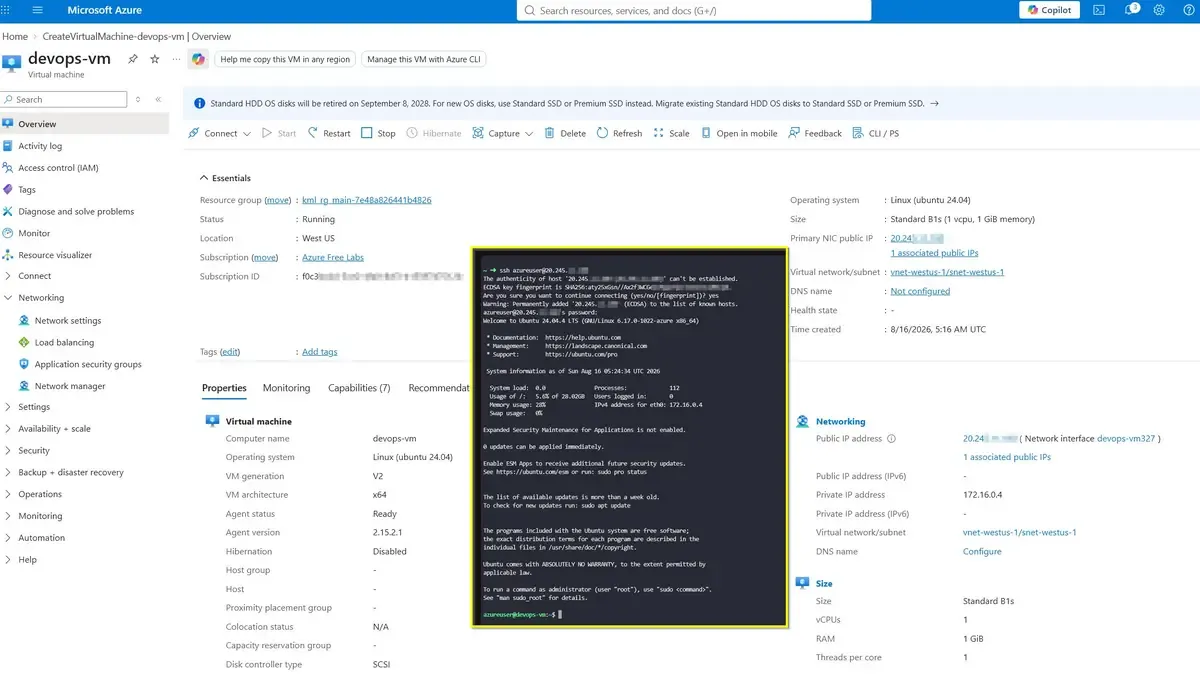
For a foundational lab or migration bootstrap, a single Linux VM with restricted SSH access provides a fast and practical operational starting point.
Exposing port 22 to the internet is acceptable for initial provisioning or lab usage, but production environments should restrict source IP ranges and preferably use Azure Bastion or a private access pattern.
Action
The implementation was executed using the Azure Portal.
Provisioning steps performed:
- Opened the Azure Portal and selected the target subscription.
- Created or selected the resource group:
kml_rg_main-7e48a826441b4826
- Started a new Azure Virtual Machine deployment.
- Entered the VM configuration:
- VM name:
devops-vm - Region:
West US - Image:
Ubuntu 24.04 LTS - Size:
Standard_B1s
- VM name:
- Configured authentication for Linux administrative access.
- Set the OS disk configuration:
- Disk size:
30 GB - Disk type:
Standard HDD
- Disk size:
- Enabled inbound access for:
- SSH (TCP 22)
- Reviewed the generated networking configuration and accepted the default supporting resources.
- Submitted the deployment and waited for Azure provisioning to complete.
- Retrieved the assigned public IP address.
- Validated secure remote access using SSH to the VM public endpoint
20.245.xx.xxx.
A typical validation command is shown below.
ssh [email protected]ssh-validation.shThe username depends on the administrator account defined during deployment. Replace azureuser with the actual Linux admin username used in the portal.
Private SSH keys must remain only on trusted client devices and must never be stored in source repositories or shared channels.
Successful validation confirmed that:
- the VM booted correctly,
- the network path was functional,
- SSH inbound access was properly configured,
- the platform was ready for the next migration or automation steps.
Azure CLI
#!/usr/bin/env bash

# Variables
RG="kml_rg_main-7e48a826441b4826"
LOCATION="westus"
VM_NAME="devops-vm"
IMAGE="Ubuntu2404"
SIZE="Standard_B1s"
ADMIN_USER="azureuser"

# Create Resource Group
az group create --name $RG --location $LOCATION

# Create VM (VNet, Subnet, NSG, and Public IP are auto-generated implicitly)
az vm create \
  --resource-group $RG \
  --name $VM_NAME \
  --location $LOCATION \
  --image $IMAGE \
  --size $SIZE \
  --admin-username $ADMIN_USER \
  --generate-ssh-keys \
  --os-disk-size-gb 30 \
  --public-ip-sku Standard

# Open SSH Port 22
az vm open-port --resource-group $RG --name $VM_NAME --port 22

# Display Public IP
az vm show --resource-group $RG --name $VM_NAME -d --query publicIps -o tsvprovision-azure-linux-vm.sh
Azure PowerShell
$ResourceGroupName = "kml_rg_main-7e48a826441b4826"
$Location = "westus"
$VmName = "devops-vm"
$VmSize = "Standard_B1s"

# Create Resource Group
New-AzResourceGroup -Name $ResourceGroupName -Location $Location

# Request admin credentials securely
$Credential = Get-Credential -Message "Enter the password for the Linux VM admin account"

# Create VM with implicitly generated network resources
New-AzVm `
    -ResourceGroupName $ResourceGroupName `
    -Name $VmName `
    -Location $Location `
    -VirtualNetworkName "devops-vm-vnet" `
    -SubnetName "default" `
    -SecurityGroupName "devops-vm-nsg" `
    -PublicIpAddressName "devops-vm-pip" `
    -Image "Ubuntu2204" `
    -Size $VmSize `
    -Credential $Credential `
    -OpenPorts 22provision-azure-linux-vm.ps1