Table of Contents
Open Table of Contents
Résumé pour la direction
Scenario
Dans le cadre d’un déploiement d’infrastructure reproductible sur Azure, l’objectif était de provisionner une machine virtuelle Ubuntu nommée devops-vm dans la région East US, avec exposition du service HTTP sur le port 80 et installation automatique de Nginx dès le premier démarrage.
Ce besoin répond à plusieurs enjeux opérationnels et métiers : accélération du provisioning, standardisation des configurations système, réduction des interventions manuelles et amélioration de la capacité de reprise. L’utilisation de Cloud-Init permet d’initialiser le serveur de manière déclarative, aussi bien depuis le Portail Azure que via Azure CLI, tout en garantissant un résultat cohérent.
Resolution
La machine virtuelle a été déployée avec succès et configurée pour installer automatiquement Nginx au boot grâce à un fichier cloud-init.txt injecté comme Custom Data. Le trafic HTTP a été autorisé au niveau réseau via le Network Security Group.
Le résultat valide une approche moderne d’administration d’infrastructure : déploiement plus rapide, configuration homogène, réduction des écarts entre environnements et meilleure préparation aux scénarios d’industrialisation, d’auto-scaling et de reprise après incident.
Technical Implementation
Topology
The target architecture is a single Ubuntu-based Azure Virtual Machine deployed in East US with HTTP (port 80) exposed for web access. The VM is named devops-vm and bootstraps Nginx automatically using Cloud-Init during first boot.
From a connectivity perspective, Azure creates or associates the required virtual networking resources, and HTTP access is explicitly allowed through the attached NSG rule. The implementation supports both a portal-based deployment and a headless CLI-driven workflow, making it suitable for learning, validation, and progression toward Infrastructure as Code practices.
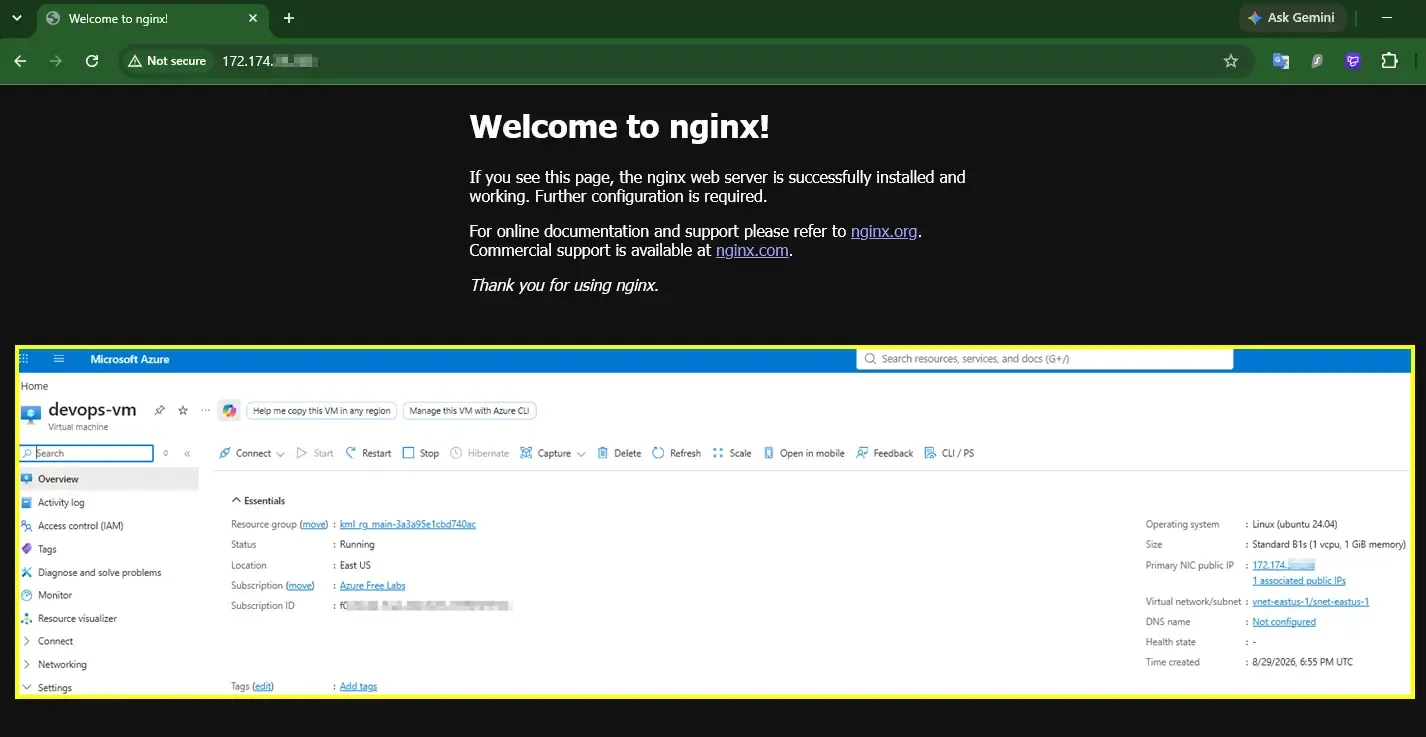
This deployment pattern is intentionally simple and efficient. Azure CLI can implicitly create supporting resources during az vm create when no pre-existing network or resource dependencies are mandated.
Architectural Insight
Cloud-Init is superior to manual SSH configuration because it shifts server initialization from an interactive, error-prone process to a declarative and repeatable bootstrap model. Instead of logging in after provisioning and installing packages by hand, the VM is configured automatically on first boot.
Key benefits include:
- Immutable infrastructure mindset: configuration is defined up front rather than manually applied afterward.
- Auto-scaling readiness: every new VM instance can self-configure identically without operator involvement.
- Faster disaster recovery: rebuilding a server becomes a provisioning task, not a restoration of undocumented manual steps.
- Operational consistency: reduces configuration drift across environments.
Cloud-Init turns VM provisioning into a predictable deployment artifact rather than a one-off administrative session.
Action
The implementation was completed using both the Azure Portal and Azure CLI, with the same Cloud-Init payload used in each path.
1. Create the Cloud-Init configuration
The following YAML installs Nginx, ensures the package cache is updated, and starts/enables the service automatically.
#cloud-config
package_upgrade: true
packages:
  - nginx

runcmd:
  - systemctl enable nginx
  - systemctl start nginxcloud-init.txt
Using cat commande to create yaml file cloud-init.txt
cat <<EOF > cloud-init.txt
#cloud-config
package_upgrade: true
packages:
  - nginx
runcmd:
  - systemctl enable nginx
  - systemctl start nginx
EOFcloud-init.txtSave the file exactly as cloud-init.txt before using it in Azure Portal Custom Data or the --custom-data CLI parameter.
2. Deploy through Azure Portal
In the Azure Portal, the VM was created with these key settings:
- Region: East US
- VM name:
devops-vm - Image: Ubuntu
- Inbound port: HTTP (port 80)
- Custom Data: contents of
cloud-init.txt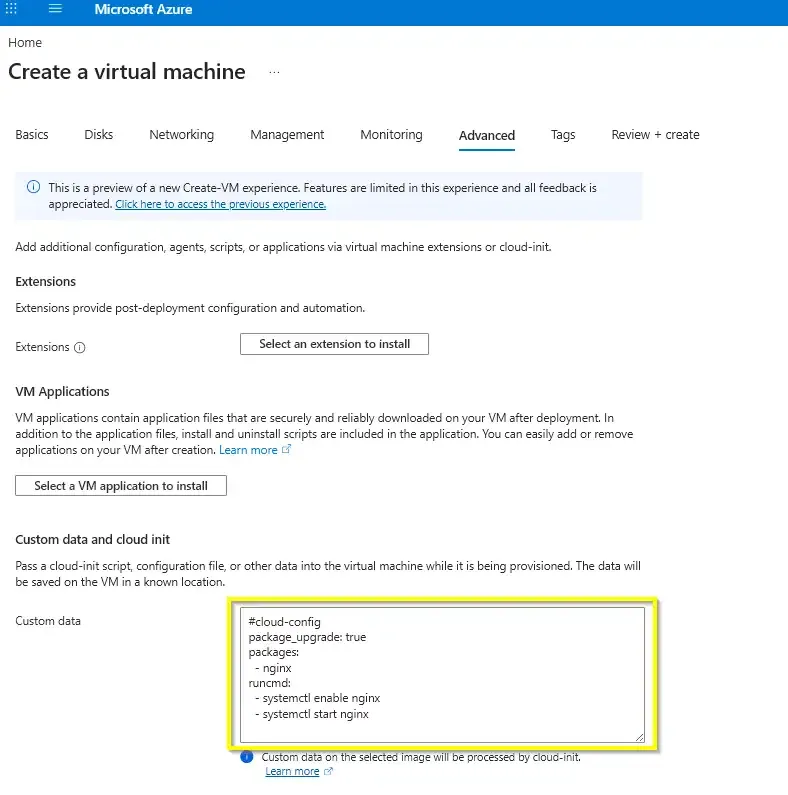
Execution flow in the portal:
- Open Create a virtual machine.
- Select the Ubuntu image and define the VM name as
devops-vm. - Choose East US as the deployment region.
- Configure authentication as required by policy.
- Under inbound rules, allow HTTP (80).
- In the Advanced section, paste the Cloud-Init YAML into Custom Data.
- Review and create the VM.
- After deployment, validate by browsing to the VM public IP.
If Custom Data is omitted, Nginx will not be installed automatically and the VM will require post-deployment manual configuration.
3. Deploy through Azure CLI
The CLI workflow provides a faster and more reproducible alternative to the GUI. It also aligns better with automation pipelines and future IaC adoption.
First, create a resource group if needed:
az group create \
  --name rg-devops-vm \
  --location eastuscreate-resource-group.sh
OR Identify your target resource group:
RESOURCE_GROUP=$(az group list --query '[].name' --output tsv)get-resource-group.shThen create the VM with Cloud-Init:
az vm create \
  --resource-group "$RESOURCE_GROUP" \
  --name devops-vm \
  --location eastus \
  --size Standard_B1s \
  --image Ubuntu2204 \
  --admin-username azureuser \
  --authentication-type ssh \
  --ssh-key-values ~/.ssh/id_rsa.pub \
  --storage-sku Standard_LRS \
  --custom-data cloud-init.txtcreate-vm.sh
Open HTTP traffic on port 80:
az vm open-port \
  --resource-group "$RESOURCE_GROUP" \
  --name devops-vm \
  --port 80open-http-port.sh
4. Validate the deployment
After the VM finishes provisioning:
- Retrieve the public IP from the Azure Portal or CLI.
- Open a browser and access
http://<public-ip>. - Confirm the default Nginx welcome page is displayed.
Optional validation via SSH:
ssh azureuser@<public-ip> "systemctl status nginx --no-pager"validate-nginx.shA successful Nginx landing page confirms that compute provisioning, bootstrap automation, and network exposure were all completed correctly.
5. Transition from GUI to IaC
This task demonstrates a practical progression path:
- Portal is useful for discovery, learning, and quick validation.
- CLI improves repeatability and speed.
- The next logical step is to convert the same deployment pattern into full Infrastructure as Code, such as Bicep or Terraform.
By externalizing initialization logic into Cloud-Init and standardizing deployment commands, the environment becomes easier to automate, version, audit, and rebuild.
Even before adopting full IaC, using az vm create with --custom-data already introduces declarative provisioning principles and reduces reliance on manual server configuration.