Table of Contents
Open Table of Contents
Résumé pour la direction
Scenario
Dans le cadre de la mise en place d’une fondation d’infrastructure cloud, cette tâche visait à déployer un socle réseau public minimal sur Azure afin d’héberger une machine virtuelle Linux accessible à distance. Le besoin répond à un cas d’usage classique de laboratoire, de validation technique ou de préparation d’environnement applicatif, où un réseau virtuel dédié, un sous-réseau isolé et une connectivité SSH contrôlée sont requis.
L’objectif était de créer un Virtual Network xfusion-pub-vnet dans la région East US, d’y associer le sous-réseau xfusion-pub-subnet, puis de provisionner la machine virtuelle xfusion-pub-vm sous Ubuntu. L’exposition publique a été volontairement limitée à l’ouverture du port 22 pour l’administration distante, conformément à un principe de surface d’attaque réduite.
Cette opération a également permis de formaliser l’équivalent Infrastructure as Code léger via Azure CLI, afin de faciliter la reproductibilité, la standardisation et l’automatisation future du déploiement.
Resolution
Le déploiement a abouti à la création d’une topologie réseau publique fonctionnelle sur Azure, comprenant un VNet, un sous-réseau, une machine virtuelle Ubuntu, une adresse IP publique dédiée et des règles de sécurité réseau autorisant l’accès SSH.
La validation fonctionnelle repose sur les points suivants :
- création réussie du réseau virtuel
xfusion-pub-vnet - association correcte du sous-réseau
xfusion-pub-subnet - déploiement de la VM
xfusion-pub-vmdans la région East US - attribution d’une Public IP à l’interface réseau de la VM
- ouverture du port 22 via les mécanismes de sécurité Azure pour l’administration distante
La valeur apportée est double : d’une part, l’environnement fournit une base réseau prête pour des usages de test, d’intégration ou de démonstration ; d’autre part, la traduction du déploiement portail vers Azure CLI prépare la transition vers une approche plus industrialisée et répétable.
Technical Implementation
Topology
The deployment was implemented in East US as a simple public-facing Azure network foundation composed of:
- Virtual Network:
xfusion-pub-vnet - Subnet:
xfusion-pub-subnet - Virtual Machine:
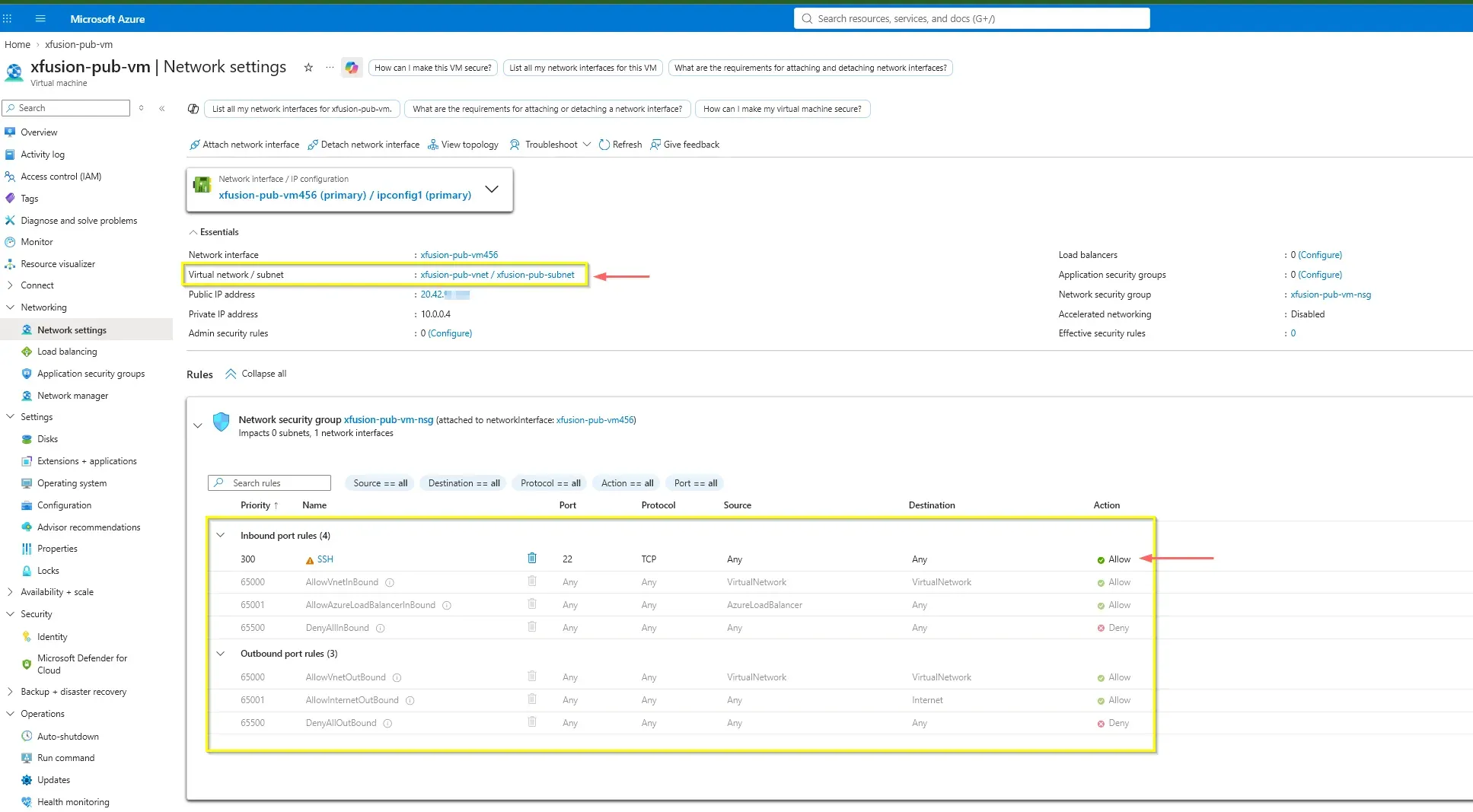
xfusion-pub-vm(Ubuntu) - Inbound Access: TCP/22 for SSH via NSG
- Public Connectivity: Dedicated Azure Public IP bound to the VM’s Network Interface

Architectural Insight: Unlike AWS, where “auto-assign public IP” is a subnet-level configuration toggle, Azure explicitly requires attaching a Public IP resource directly to the Virtual Machine’s Network Interface (NIC). Public exposure in Azure is modeled as an explicit resource association rather than an inherited subnet behavior.
Action
The environment was successfully provisioned through the Azure Portal, serving as a validation baseline before transitioning to automated provisioning.
1. Portal-Based Deployment & Network Security
The deployment flow involved defining the VNet, mapping the subnet, and attaching a standard Public IP to the compute instance. A critical step was ensuring the Network Security Group (NSG) allowed inbound SSH connectivity to the public endpoint.
2. Azure CLI Equivalent (Infrastructure as Code)
To transition from GUI-based provisioning to a repeatable headless execution, the deployment maps cleanly to the following Azure CLI commands. This pattern utilizes the existing local SSH key (BYOK) for secure authentication.
RESOURCE_GROUP="kml_rg_main-e21b302b8ac34206"
LOCATION="eastus"

# 1. Create the Virtual Network and Subnet
az network vnet create \
  --resource-group "$RESOURCE_GROUP" \
  --location "$LOCATION" \
  --name "xfusion-pub-vnet" \
  --address-prefixes "10.0.0.0/16" \
  --subnet-name "xfusion-pub-subnet" \
  --subnet-prefixes "10.0.1.0/24"

# 2. Deploy the VM, assign a Public IP, and inject the local SSH key
az vm create \
  --resource-group "$RESOURCE_GROUP" \
  --location "$LOCATION" \
  --name "xfusion-pub-vm" \
  --image "Ubuntu2204" \
  --admin-username "azureuser" \
  --authentication-type "ssh" \
  --ssh-key-values ~/.ssh/id_rsa.pub \
  --vnet-name "xfusion-pub-vnet" \
  --subnet "xfusion-pub-subnet" \
  --public-ip-sku "Standard"

# 3. Explicitly allow SSH inbound traffic
az vm open-port \
  --resource-group "$RESOURCE_GROUP" \
  --name "xfusion-pub-vm" \
--port 22deploy-network-foundation.shOpening SSH to the internet is acceptable for lab validation, but production environments should restrict source IP ranges, use Just-in-Time access, Azure Bastion, or private administration paths wherever possible.
3. Connectivity Validation
The final validation confirms both Inbound access (SSH) and Outbound internet connectivity (ICMP/Ping).
az vm show \
  --resource-group "kml_rg_main-e21b302b8ac34206" \
  --name "xfusion-pub-vm" \
  --show-details \
  --output table

az network vnet show \
  --resource-group "kml_rg_main-e21b302b8ac34206" \
  --name "xfusion-pub-vnet" \
  --output tablevalidate-deployment.sh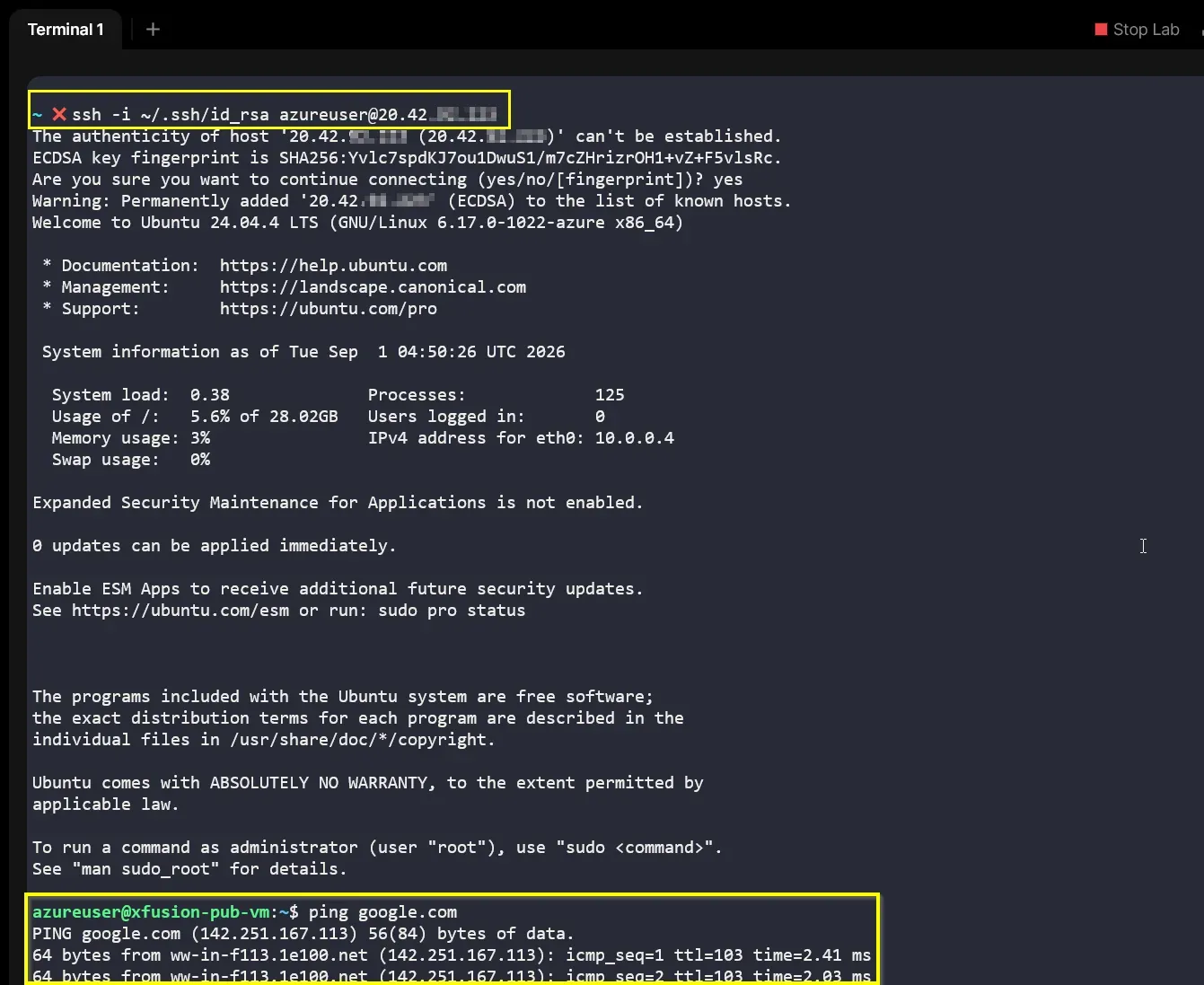
Architectural Insight: The successful ping google.com validates outbound connectivity. In Azure, when a VM is explicitly assigned a Public IP, the Azure infrastructure automatically provides Implicit SNAT (Source Network Address Translation) through that IP, allowing the VM to reach the internet without requiring a separate NAT Gateway.
The resulting topology delivers a reusable public network foundation that can be extended with additional subnets, private workloads, NSG hardening, or converted into full IaC (Bicep/Terraform) templates.