Table of Contents
Open Table of Contents
Résumé pour la direction
Scenario
Dans le cadre d’une stratégie de sécurisation d’infrastructure cloud, l’objectif était de déployer une machine virtuelle Azure totalement isolée d’Internet public. Ce besoin correspond à un modèle d’hébergement pour charges sensibles, comme des bases de données, des services internes ou des composants backend ne devant jamais être exposés directement.
L’exigence principale consistait à créer un réseau virtuel privé dans la région Central US, puis à y déployer une machine virtuelle sans adresse IP publique. En complément, un Network Security Group (NSG) devait appliquer une politique d’accès très restrictive, en autorisant uniquement le trafic SSH sur le port 22 depuis l’espace d’adressage interne du VNet 10.0.0.0/16.
Cette approche répond à des enjeux de réduction de surface d’attaque, d’alignement avec les principes Zero Trust, et de conformité avec les bonnes pratiques de segmentation réseau en environnement cloud.
Resolution
Le déploiement a abouti à la création d’une architecture privée composée du réseau datacenter-priv-vnet en 10.0.0.0/16, d’un NSG nommé datacenter-priv-nsg, et d’une VM datacenter-priv-vm configurée explicitement sans IP publique.
La validation fonctionnelle a confirmé que la machine virtuelle n’était pas joignable depuis Internet, tout en restant administrable uniquement depuis le périmètre réseau autorisé. Cette implémentation apporte une valeur immédiate en renforçant la posture de sécurité, en limitant l’exposition des ressources critiques, et en préparant une architecture conforme aux modèles d’accès via Jumpbox ou Azure Bastion.
Technical Implementation
Topology
The solution was deployed in Central US using a private-only network design, enforcing complete isolation from the public internet:
- Virtual Network:
datacenter-priv-vnet(Address Space:10.0.0.0/16) - Subnet:
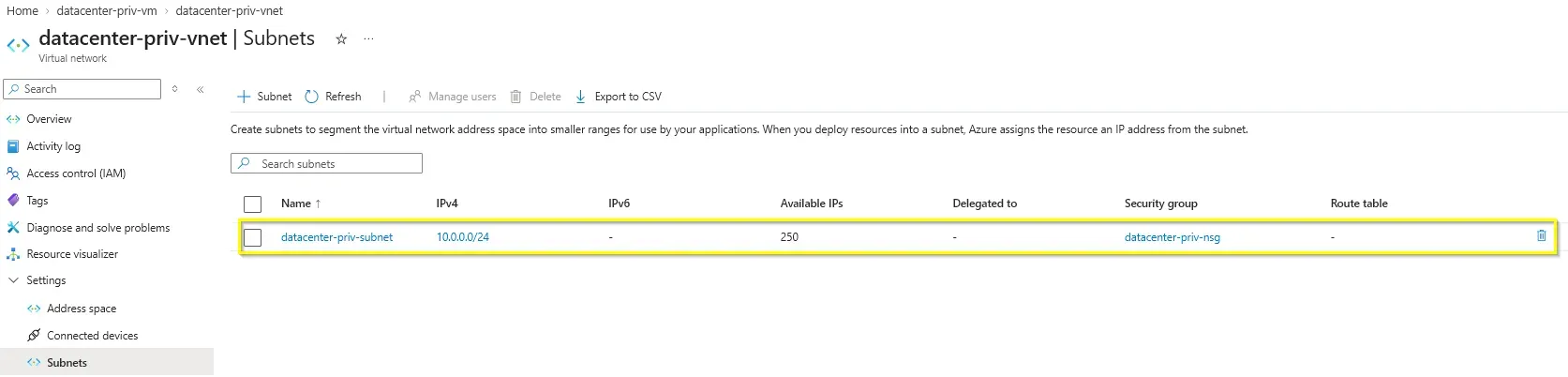
datacenter-priv-subnet(Address Space:10.0.0.0/24) - Virtual Machine:
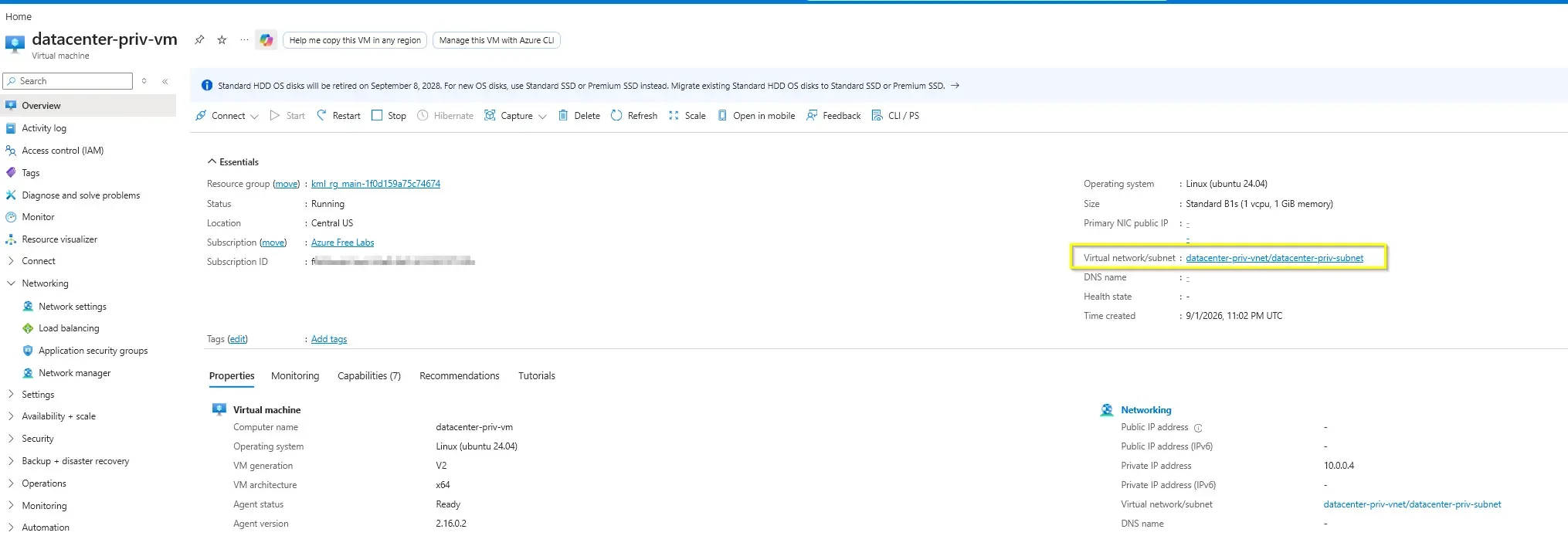
datacenter-priv-vm(No Public IP) - Public Exposure: None
- Security Control:
datacenter-priv-nsg(Attached at the Subnet level) - Inbound Rule: Allow SSH (
TCP/22) exclusively from10.0.0.0/16to10.0.0.0/16
This is a classic headless/CLI-friendly backend pattern where the VM is intentionally not exposed to the public Internet. Instead of assigning a public endpoint, connectivity is expected to traverse controlled internal paths.
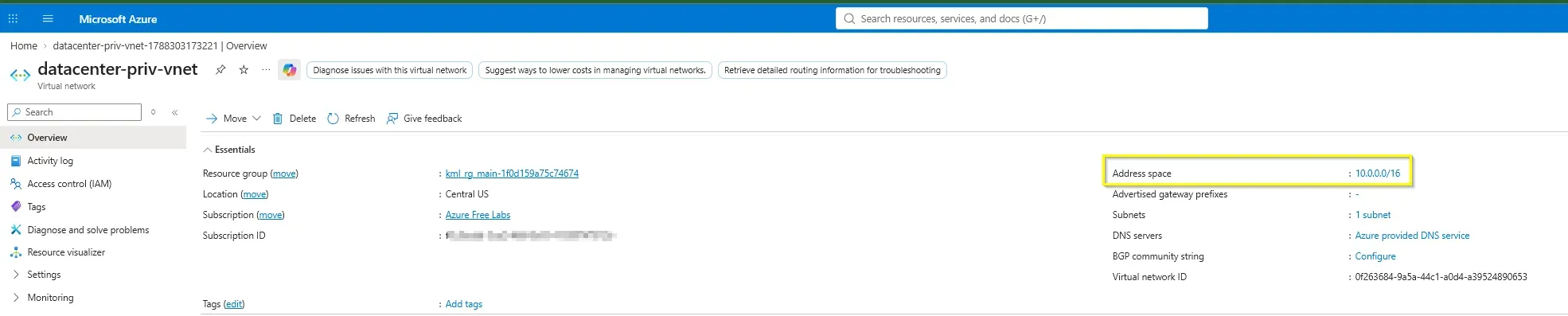
Azure CLI can implicitly create dependent resources when appropriate, but in this lab the VNet, NSG, and NSG rule were created explicitly to enforce a clear and auditable private-network design.
Architectural Insight
This deployment reflects a zero-trust backend architecture. Virtual machines hosting databases, internal applications, middleware, or administrative services should not be assigned Public IPs because direct Internet exposure increases the attack surface for brute-force attempts, credential abuse, vulnerability scanning, and lateral movement scenarios.
A more secure enterprise pattern is:
- Backend VMs remain private-only.
- Network Security Groups (NSGs) are attached at the Subnet level (rather than per-NIC) to enforce consistent security policies across all resources within that segment.
- Administration is routed through a Jumpbox, Azure Bastion, or an ExpressRoute/VPN connection.
In practice, administrators first connect to a controlled entry point inside the VNet, then access the backend VM over private IP space. This preserves manageability while enforcing strong network isolation.
Action
The implementation was first validated through the Azure Portal to confirm the state of the resources, followed by mapping the deployment to Azure CLI for repeatability.
Azure Portal Steps
The network foundation was established by creating the VNet and defining the Subnet. Crucially, the NSG was associated directly with the Subnet. This ensures that any VM deployed into this Subnet automatically inherits the restrictive SSH rules without requiring individual NIC configuration.
Subsequently, the Virtual Machine was provisioned. The configuration explicitly omitted a Public IP address. The resulting state confirms the VM only holds a private IP (10.0.0.4) and relies entirely on internal VNet routing.
Allowing SSH from the full VNet CIDR is acceptable for a segmented backend zone, but strict production environments should narrow administrative access further to specific management subnets or Bastion IP ranges.
Infrastructure as Code (Azure CLI) Commands
To move from portal-driven provisioning to a repeatable headless deployment, the following Azure CLI script recreates the exact architecture demonstrated above. It explicitly handles Subnet-level NSG attachment and ensures the VM is deployed without a public endpoint (--public-ip-address "").
RESOURCE_GROUP=$(az group list --query '[].name' --output tsv)
LOCATION="centralus"

# 1. Create the NSG and define the restrictive internal SSH rule
az network nsg create \
  --resource-group "$RESOURCE_GROUP" \
  --name datacenter-priv-nsg \
  --location "$LOCATION"

az network nsg rule create \
  --resource-group "$RESOURCE_GROUP" \
  --nsg-name datacenter-priv-nsg \
  --name allow-ssh-internal \
  --priority 100 \
  --direction Inbound \
  --access Allow \
  --protocol Tcp \
  --source-address-prefixes 10.0.0.0/16 \
  --source-port-ranges '*' \
  --destination-address-prefixes 10.0.0.0/16 \
  --destination-port-ranges 22

# 2. Create the VNet and Subnet, attaching the NSG at the Subnet level
az network vnet create \
  --resource-group "$RESOURCE_GROUP" \
  --name datacenter-priv-vnet \
  --location "$LOCATION" \
  --address-prefixes 10.0.0.0/16 \
  --subnet-name datacenter-priv-subnet \
  --subnet-prefixes 10.0.0.0/24 \
  --network-security-group datacenter-priv-nsg

# 3. Deploy the Virtual Machine explicitly WITHOUT a Public IP
az vm create \
  --resource-group "$RESOURCE_GROUP" \
  --name datacenter-priv-vm \
  --location "$LOCATION" \
  --image Ubuntu2204 \
  --admin-username azureuser \
  --authentication-type ssh \
  --ssh-key-values ~/.ssh/id_rsa.pub \
  --vnet-name datacenter-priv-vnet \
  --subnet datacenter-priv-subnet \
--public-ip-address ""deploy-private-backend.shBy passing the empty string "" to the —public-ip-address parameter, we override Azure CLI’s default behavior of automatically generating a public IP for new VMs, ensuring strict adherence to the private-only design.
IaC and Operational Mindset
The main operational shift here is moving from portal-driven provisioning to repeatable CLI-based deployment. Even for a small lab, using Azure CLI provides:
- consistent build logic
- easier validation and reuse
- simpler transition toward full IaC with Bicep or Terraform
- lower risk of configuration drift
The commands remain intentionally concise and rely on Azure-native behavior where appropriate, avoiding unnecessary over-engineering.
Final state: a private VM was successfully deployed inside datacenter-priv-vnet, protected by datacenter-priv-nsg, and exposed only to internal VNet-originated SSH traffic with no Public IP attached.